Decide what to post before you schedule it
Your social scheduler should not publish every idea an AI or a teammate drops in chat. Good practice is to ask three questions before you post: Is it relevant? Is it engaging? Is it actionable? You should also ask whether the copy fits each network — or whether one Global caption is enough.
Add two more checks: do you have strong visuals, and is the post customized for the channel it will appear on? Cross-posting the same text everywhere without edits often underperforms.
OpenQuok models that split in the composer: Global mode shares one caption and one media list across selected channels. Per-channel mode lets each network keep its own copy and attachments. The Public API uses body, isGlobal, bodiesByIntegrationId, and mediaByIntegrationId — the same idea as the dashboard globe vs channel avatars. See Global vs per-channel.
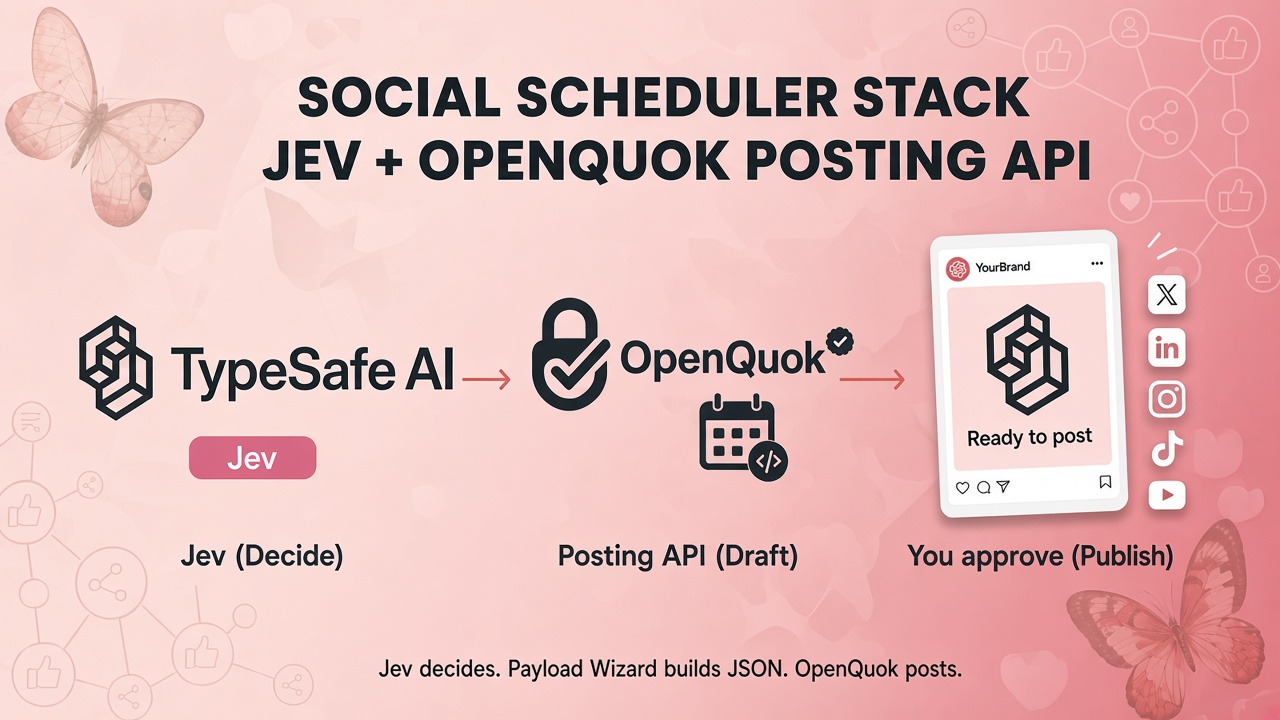
Jev (a decision model from TypeSafe AI) can score those checks in one fast call. It returns typed answers and confidence — not a long essay. OpenQuok does not ship Jev. You compose both in your app. Full sample: Jev decision routing example.
LLMs write. Decision models choose — and cost less at the gate
Large language models generate text token by token. That is ideal for drafts and rewrites. Many scheduling gates do not need prose. They need labels: ready or not, Global or per-channel, needs media or not.
Decision models answer inside a schema you define. Jev supports Choice, Score, and Noul (yes/no probability). You pay for compact input; structured answers are cheap compared with asking a large LLM to write a paragraph every time a teammate pastes a caption. Use Jev on every proposal as the whether and how gate. Call an LLM only when copy still needs rewriting.
That split matters in a CLI or agent loop: you can run Jev on hundreds of drafts without paying full chat-completion prices, then fill a predefined OpenQuok JSON recipe only when the scores pass.
Encode “what to post” as Jev questions
One systemOne call can score all five checks. If a gate fails, stop or send the item to a human — do not enqueue a scheduled post.
Relevant — Noul: is this useful to the audience (inform, entertain, or community)?
If it fails: do not create an OpenQuok draft.
Engaging — Score: would someone want to read and react?
If it fails: send to human review and revise copy.
Actionable — Noul: would someone share, comment, or click?
If it fails: optional extra gate before automation.
Visuals — Noul: does this need a photo or video?
If it fails: still create a
draft, but add a kanban note to attach media.Channel fit — Choice:
compose_mode(Global, per-channel copy, settings-only, or not ready).If it fails or is
not_ready: skip the API call; edit in the composer.
The compose_mode choice maps directly to OpenQuok JSON — the same shapes the CLI and openquok-core skill already ship as examples:
global_same_copy— onebody,isGlobal: true, multipleintegrationIds(likethreads-text-only.json).per_channel_copy—bodiesByIntegrationIdfor different captions per UUID (likemulti-platform-campaign.json).global_copy_per_channel_settings— sharedbody, differentproviderSettingsByIntegrationId(YouTube title, Instagrampost_type, etc. — likeyoutube-video-title-privacy.json).not_ready— no API call; human edits in the composer.
Those files live under agent/skills/openquok-core/resources/examples/. Agents do not invent payload shape from scratch: Jev picks a mode, your script copies the matching example, fills channel UUIDs and caption, then runs openquok posts:create --json. Install the skill from CLI getting started or assemble recipes in Skill Builder. To inspect the same JSON in a browser, use Payload Wizard.
Architecture: decide → fill a recipe → approve
Decide — Jev runs relevant / engaging / actionable / visuals / compose_mode in one cheap
systemOnecall.Compose — Map
compose_modeto a predefinedopenquok-coreexample (or preview it in Payload Wizard) and fillPublicCreatePostDto.Execute — CLI:
openquok posts:create --json. SDK:postAsAgent()against the posting API. Use scheduling API examples when you needscheduledAtorrepeatInterval.Approve — Teammates review on the OpenQuok calendar or kanban, attach media if needed, then schedule.
Multi-tenant apps store each user’s opo_ token after OAuth2 Authorization Code. CLI and CI use a workspace programmatic token instead. See OAuth2 for apps and the full walkthrough at Jev decision routing example.
TypeScript sketch
Ask Jev whether the post is ready and how to compose it. Then map compose_mode onto a known OpenQuok recipe instead of generating JSON from an LLM:
const decision = await jev.systemOne({
  state: { proposal: { caption: globalCaption, targets: ["threads", "linkedin"] } },
  questions: {
    relevant: noul("The post is relevant — it informs, entertains, or serves the audience"),
    engaging: score("How engaging is this copy for social feeds?", [
      "Flat or generic",
      "Acceptable — clear but not compelling",
      "Strong — likely to earn likes or replies",
    ]),
    actionable: noul("A reader would want to share, comment, or take a clear next step"),
    needs_media: noul("The post requires or strongly benefits from a photo or video"),
    compose_mode: choice("How should OpenQuok compose this post?", {
      global_same_copy: "One caption for every selected channel",
      per_channel_copy: "Different caption per network",
      global_copy_per_channel_settings: "Same caption; platform settings differ",
      not_ready: "Copy is not ready to schedule",
    }),
  },
});

if (decision.answers.compose_mode.choice === "global_same_copy") {
  await openquok.postAsAgent({
    status: "draft",
    body: globalCaption,
    integrationIds: [threadsId, linkedInId],
    isGlobal: true,
    isAgent: true,
    scheduledAt: tomorrowIso,
  });
}
Runnable copy: sdk/examples/jev-route-draft.mjs (aligned with the doc page). The CLI equivalent is: pick threads-text-only.json (or multi-platform-campaign.json), substitute IDs, then openquok posts:create --json ./payload.json.
When to stay Global vs customize per channel
Stay Global when the same announcement and attachments should go everywhere and only settings differ (post type, title, tags). Customize per channel when tone, length, hashtags, or media differ — Threads casual, LinkedIn formal, Instagram square crop. Jev’s per_channel_copy branch matches the second case; your team still approves in the composer before publish.
CLI, MCP, and the posting API
The decision step is identical everywhere. Only execution changes:
CLI —
openquok-coreexamples are the contract. Jev chooses the file; the CLI posts it. See CLI usages and CLI examples.MCP — Agents using OpenQuok MCP can call
schedulePostToolwith the same JSON after Jev decides.HTTP / SDK — Same payload on the posting API hub; add
scheduledAtfrom the scheduling API hub when you need a future publish.
What we are not claiming
OpenQuok does not operate or resell Jev.
Decision models do not replace LLMs for writing great captions.
Automated drafts should stay
draftuntil a human confirms relevance, visuals, and channel fit.
Takeaway
A modern social scheduler stack separates judgment from scheduling. Jev is a cheap typed gate for “should we post this, and how?” OpenQuok already has predefined JSON recipes for Global vs per-channel posts — fill them from the CLI, Payload Wizard, or posting API. Start with Jev decision routing example.