Skool
Connect Skool to OpenQuok with the browser extension while you are signed in on skool.com.
Connect your agent today
Draft from chat, review in your calendar, and publish only what you approve.
Overview
Note
Self-host installs do not register a Skool developer app or add Skool secrets to the backend. Each member connects with the OpenQuok browser extension while logged in to Skool.
OpenQuok uses your active Skool browser session. Our OpenQuok chrome extension reads required session cookies, and OpenQuok stores the session encrypted for publishing.
Danger
Anyone who can use your Skool session can post as you. Sign out of Skool when you are done, and review Skool’s terms before you connect.
Warning
Cookie-based connect may conflict with platform rules. You accept that risk. OpenQuok does not guarantee access if Skool changes its site or APIs.
Prerequisites
- Google Chrome (or a Chromium browser that supports the same extension APIs).
- The OpenQuok browser extension installed — see Browser extension.
- VITE_OPENQUOK_BROWSER_EXTENSION_ID set on the web app you use for the dashboard.
- An active login on skool.com in the same browser profile.
Connect Skool
Install and configure the extension
Follow Browser extension. Confirm the extension ID matches your env.
Sign in on Skool
Open Skool and sign in. The extension needs auth_token and client_id cookies for .skool.com.
Add the channel
In your workspace, open Add Channel → Skool. Read the browser-extension notice, then continue.
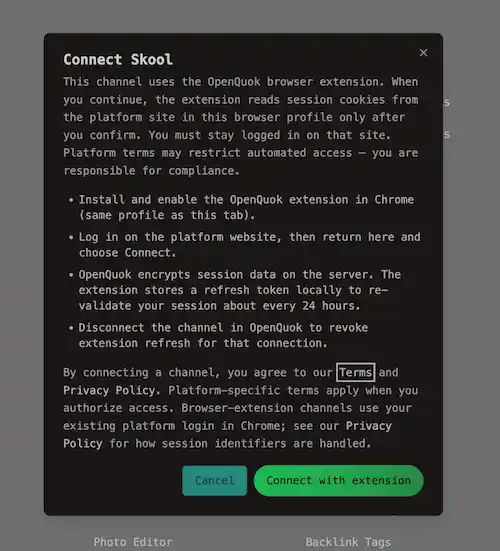
OpenQuok reads cookies, validates your account, and saves the channel.
Allow automatic refresh
After a successful connect, OpenQuok registers a refresh token in the extension.
About every 24 hours the extension sends updated cookies so scheduled posts keep working.
Disconnecting the channel removes that registration when you use Disconnect on the dashboard.
Features
Supported
| Feature | Details |
|---|---|
| Browser extension connect | Add Channel → Skool while signed in on skool.com in the same Chrome profile — see Browser extension |
| Text posts | Plain text in the standard caption editor, up to 5,000 characters |
| Title and group | Required Title and Group in composer Settings — keys title / skool.title and group / skool.group |
| Post to groups | Publish to Skool groups you belong to; load options with the dashboard pickers or openquok integrations:trigger (groups) |
| Labels | Optional label per group — label / skool.label or label tool with group id |
| Images | Attach images in the composer; OpenQuok uploads to Skool file storage at publish time (main post and follow-up rows) |
| Follow-up comments | Scheduled threaded comments after the main post, with per-reply delaySeconds and optional media when the group allows — see Threads and comments |
| Automatic session refresh | After connect, the extension re-sends session cookies about every 24 hours via POST /api/v1/integrations/extension-refresh so scheduled posts keep working |
Composer field reference: Per-channel settings.
Not supported
| Feature | Notes |
|---|---|
| OAuth connect | No operator Skool app or backend OAuth keys — extension session only |
| Public OAuth URL | GET /api/v1/public/social/skool returns 400; connect in the dashboard |
| Invite links | OAuth redirect networks only — members add Skool from the dashboard themselves |
| Account analytics | No Skool workspace analytics in OpenQuok |
| Per-post analytics | No Skool post metrics in OpenQuok |
| Channel plugs | Auto-repost, auto-plug, and cross-account comment plugs are not available on skool |
| Skool native video | Publish path sends empty video_ids; use image attachments instead |
| @-mention lookup | Plain caption only — no POST /integrations/mentions for Skool |
If the channel shows Refresh needed, sign in on Skool again in Chrome, then Refresh connection and repeat the extension flow.
How OpenQuok stores the session
OpenQuok encrypts the session cookie payload on the server (same integration token storage as other channels). The extension keeps only a signed refresh JWT locally to call POST /api/v1/integrations/extension-refresh with updated cookies. Details are in the Privacy Policy.