TikTok
How to configure TikTok for OpenQuok
Connect your agent today
Draft from chat, review in your calendar, and publish only what you approve.
Overview
TikTok publishing uses TikTok OAuth 2.0 (with PKCE).
You need a TikTok Developer, with Login Kit, Share Kit and Content Posting API, with backend env vars TIKTOK_CLIENT_ID and TIKTOK_CLIENT_SECRET.
TikTok servers fetch media from your storage via HTTPS URLs (“pull from URL” flow).
That makes your public media base URL and TikTok domain verification critical for successful publish.
Note
Connecting TikTok in OpenQuok does not replace account warm-up. For new or barely used accounts, follow How to warm up a TikTok account to reach a US audience before you rely on reach or schedule heavy posting.
Backend environment
OpenQuok reads TikTok credentials only through backend/config/GlobalConfig.ts. Set:
- TIKTOK_CLIENT_ID — TikTok **Client key** from your TikTok app Credentials section
- TIKTOK_CLIENT_SECRET — TikTok **Client secret**
Copy from backend/.env.development.example into backend/.env.development.local, fill values, then restart the backend.
Tip
For self-host or development, on TikTok Developer — My Apps, switch the toggle to Sandbox, create a sandbox, configure products (Login Kit, Share Kit, Content Posting API), then click Apply changes. Copy the Sandbox client key and client secret into the env vars above. For production deployments, use Production credentials instead — they do not work interchangeably.
The frontend base URL used for OAuth redirects comes from FRONTEND_DOMAIN_URL and must be HTTPS for TikTok in typical setups (local dev: https://localhost:5173).
OAuth redirect URI (register in TikTok)
TikTok redirects the browser back to your web app after consent—not to /api/v1. The backend builds the redirect from FRONTEND_DOMAIN_URL plus:
/integration/oauth/tiktok- Production: register
https://YOUR-FRONTEND-DOMAIN/integration/oauth/tiktok- Local development:
https://localhost:5173/integration/oauth/tiktokPublic media URLs
TikTok fetches media server-side via HTTPS URLs. Before you can publish reliably, ensure OpenQuok can resolve each attachment to a public URL and that TikTok accepts that domain.
Choose one media storage strategy:
- Cloudflare R2 (recommended for production) — set STORAGE_PROVIDER=r2 and STORAGE_R2_PUBLIC_BASE_URL so objects have a stable public hostname.
- See R2 or local storage.
- Local disk (development or self-host) — set STORAGE_PROVIDER=local and ensure your deployment serves
/uploads/*on your public HTTPS origin.
Note
In local development, Vite can proxy /uploads to the backend. The key requirement for TikTok is that the URL TikTok fetches is HTTPS.
Warning
TikTok can reject PULL_FROM_URL publishing if your media host is not verified(common error: url_ownership_unverified). Verify the exact hostname you use for public media (for example, your R2 custom domain or your app origin serving /uploads).
TikTok Developer app setup
Follow TikTok’s developer portal flow, then apply the OpenQuok-specific details below.
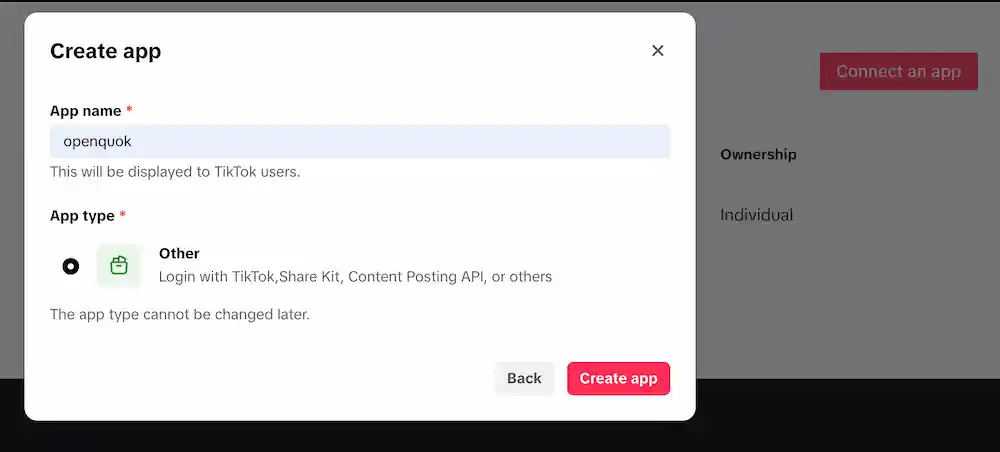
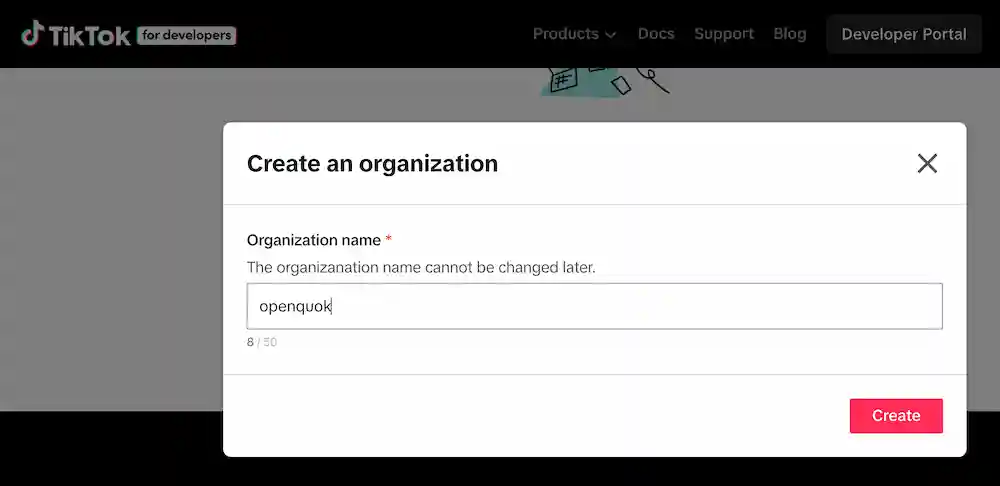
Create an app in TikTok Developer
Open TikTok Developer — My Apps and create a new app.
Tip
Configure the App Details
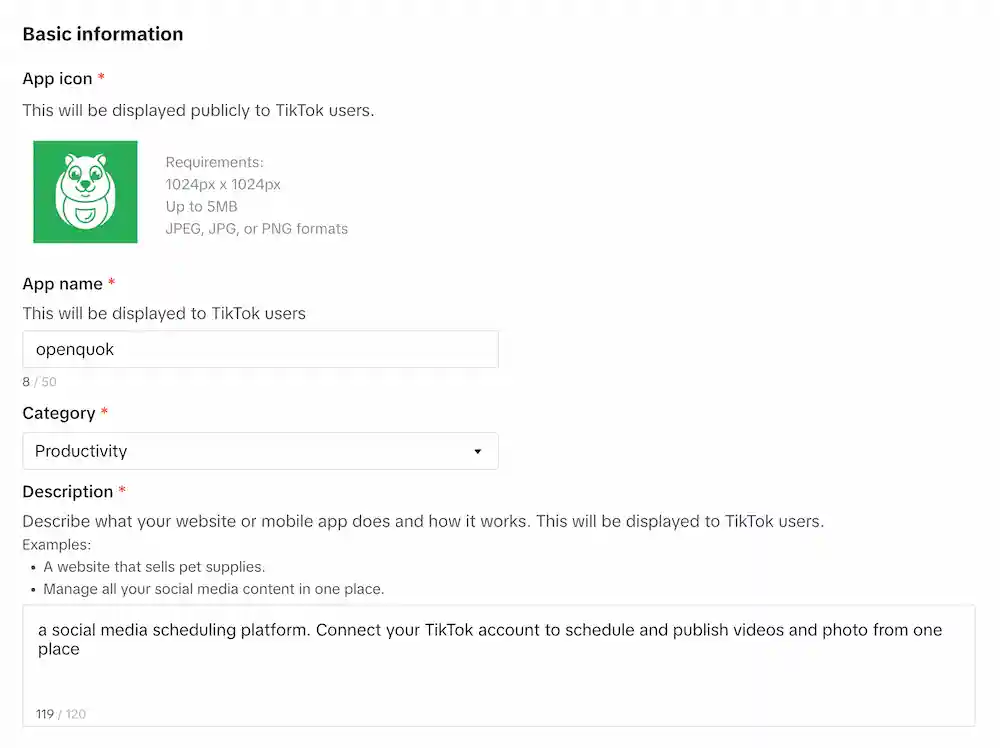
In App Details → Basic Information:
Fill required app information (app name, category, description).
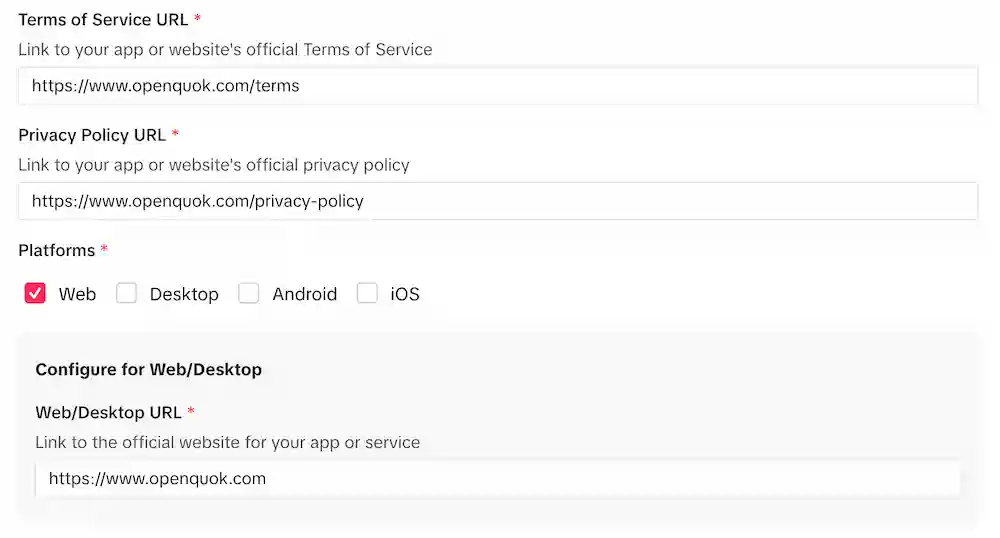
Fill required urls (term of service, privacy policy, web urls).
For OpenQuok-hosted deployments, register your public Terms and Privacy Policy URLs (for example https://www.openquok.com/terms and https://www.openquok.com/privacy-policy). TikTok app review requires these links to be active and visible on your official website without opening a menu.
Note
Enable Web + Login Kit + Add redirect URI
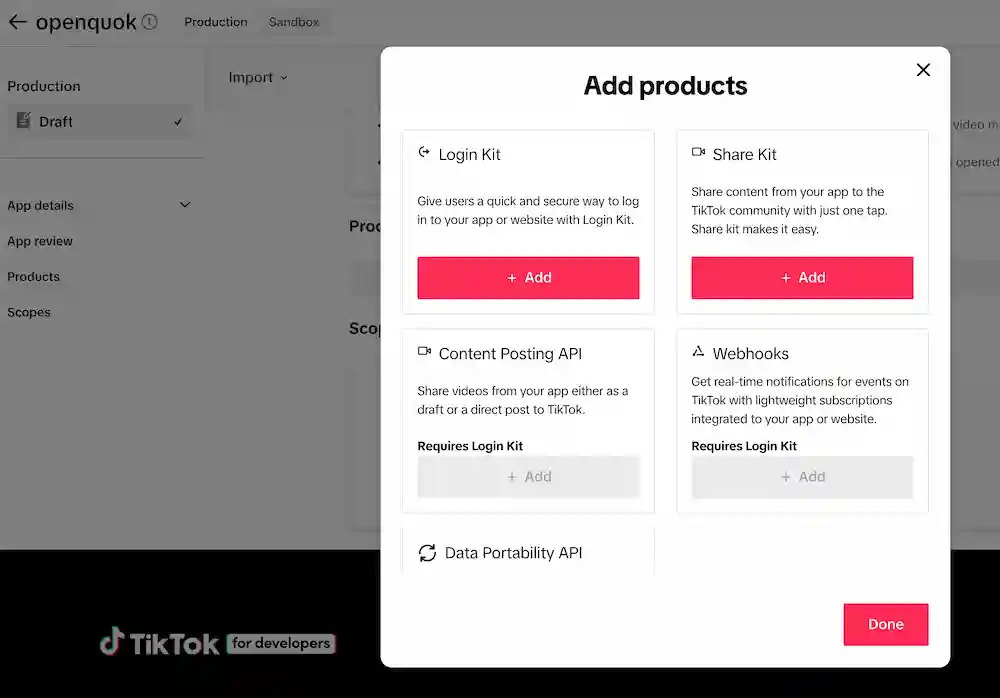
In Product → + Add products:

Add the Login Kit product for OAuth.
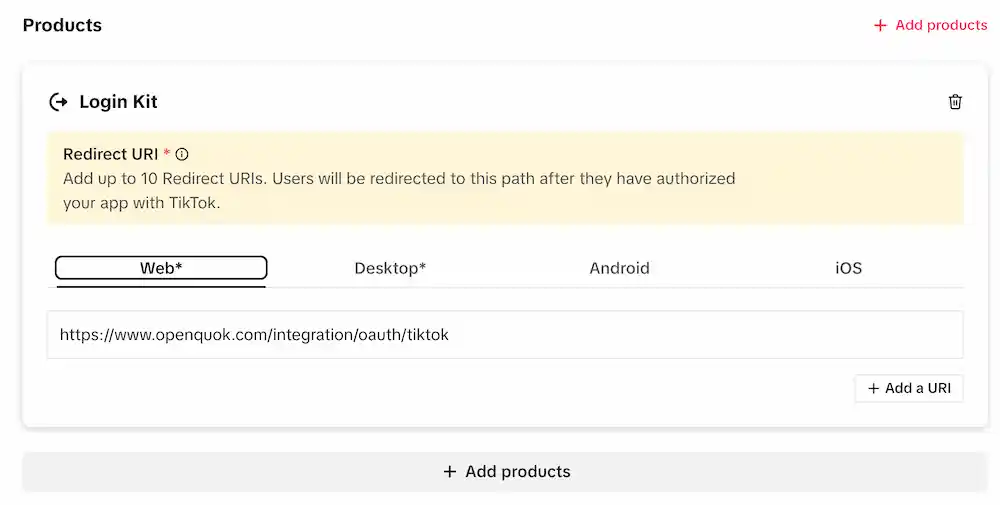
For Product → Login Kit → Web, add the redirect URI from the OAuth redirect URI section to your app’s valid redirect list.
For production url, we can add as web url:
Local redirect URI
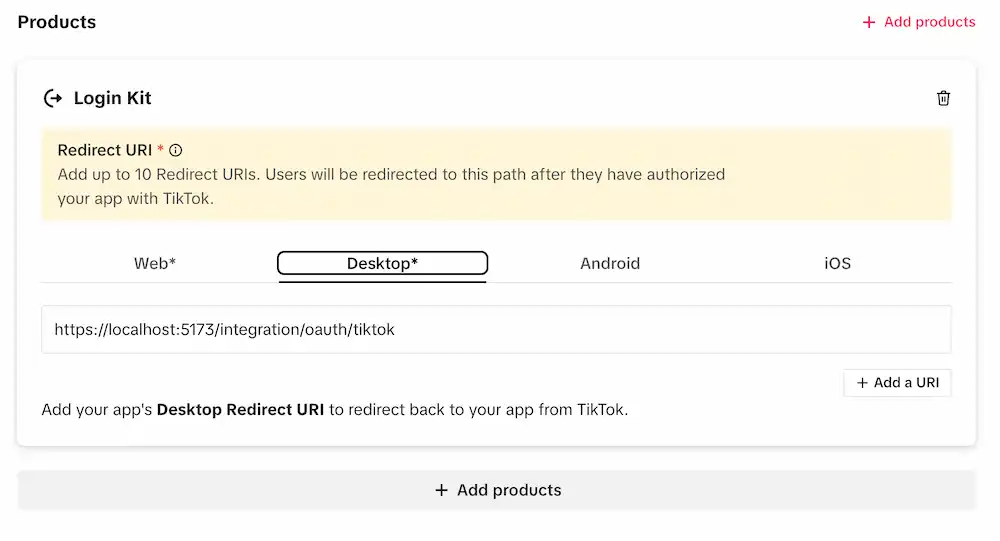
TikTok Web Login Kit does not accept localhost redirect URIs, even in Sandbox. For local OpenQuok, register a Desktop redirect URI (see above) or connect against your deployed frontend, for example https://www.openquok.com/integration/oauth/tiktok with FRONTEND_DOMAIN_URL set to match.
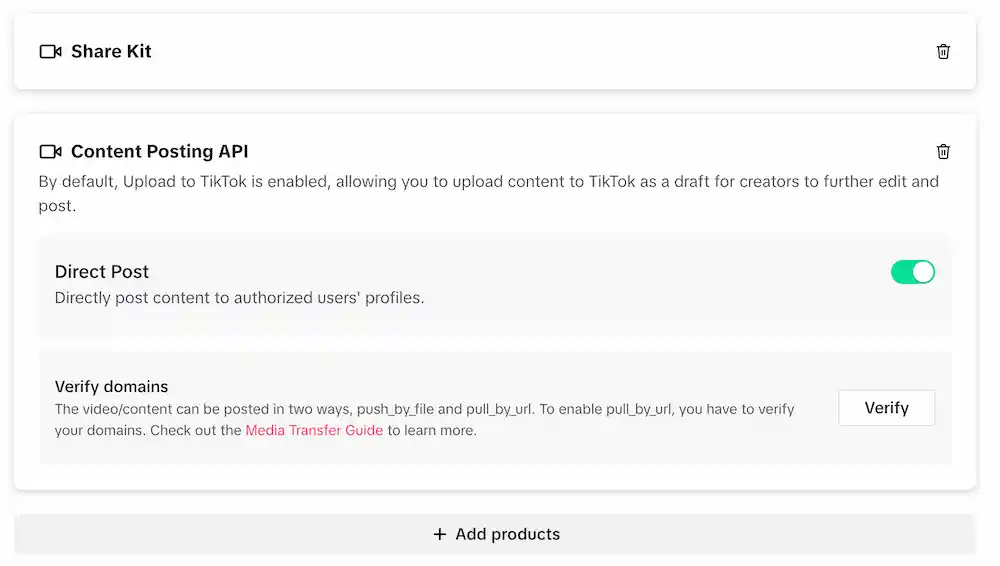
Enable Content Posting API (Direct Post)
In Product → + Add products:
Add both Share Kit and Content Posting API
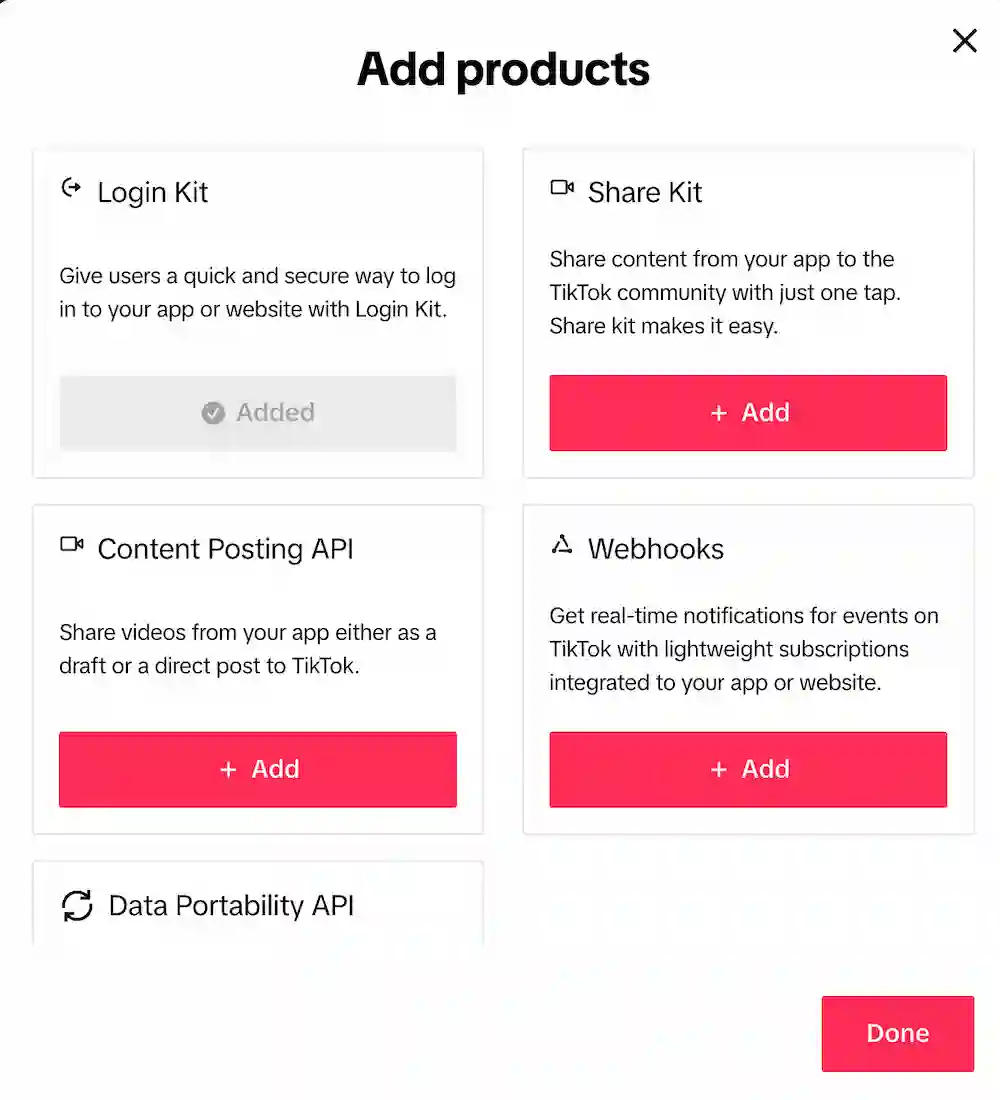
In Content Posting API, ensure Direct Post is allowed for your app.
Add required scopes
In Scopes, configure the scopes your app needs. They include:
- user.info.basic
- user.info.profile
- user.info.stats
- video.publish
- video.upload
- video.list
Verify your media domain
Verify the hostname that serves your media (R2 public host or your app origin that serves /uploads/*) so TikTok can pull URLs during publish.
Add target users (Sandbox mode)
In Sandbox settings → Target users, click Add account and sign in with each TikTok account that will connect a channel during development.
Sandbox vs Prod
While the app is in Sandbox, only listed target users can complete OAuth. Switch to Production and submit for app review when you are ready for public access.
Sandbox API limits
TikTok Sandbox can restrict Content Posting API behavior (for example public video publish).
Revoke OAuth
- On mobile: TikTok → Profile → Menu → Settings and privacy → Security → Manage app permissions, then remove OpenQuok.
Features
Supported
| Feature | Details |
|---|---|
| Video publish | Exactly one video attachment |
| Photo carousel publish | One or more images (no mixed video + images) |
| Caption length | Up to 2,000 characters (TikTok provider limit) |
| Privacy | PUBLIC_TO_EVERYONE, MUTUAL_FOLLOW_FRIENDS, FOLLOWER_OF_CREATOR, SELF_ONLY (availability depends on account) |
| Posting method | DIRECT_POST (publish immediately) or UPLOAD (send to user inbox) |
| Duet / Stitch / Comments toggles | Optional per post |
| Brand disclosure toggles | Optional per post (brand/organic) |
| Platform analytics | Account metrics (followers, following, likes, video count) plus aggregated recent-video engagement (views, likes, comments, shares) via user.info.stats and video.list |
| Per-post analytics | Views, likes, comments, and shares on a published video when the post row has a linked TikTok video id |
| Missing release id recovery | List recent TikTok videos and link inbox uploads (releaseId=missing) via posts:missing → posts:connect — see CLI Examples — TikTok |
Tip
CLI walkthroughs: CLI Examples — TikTok.
Not supported
| Feature | Notes |
|---|---|
| Mixed media (video + images) | TikTok publish requires either a single video or an image carousel |
| Binary upload from OpenQuok | OpenQuok publishes via public HTTPS URLs; it does not stream bytes directly to TikTok |
Warning
When your TikTok app is not audited/approved for broader access, TikTok can restrict publishing to SELF_ONLY (private). If you see privacy-level errors or unexpected private posts, complete the relevant TikTok review steps for your app.
Troubleshooting
Unverified URL
Verify the media hostname in TikTok developer settings and ensure your public URLs are HTTPS.
Only Private Publish for Unverified APp
For unaudited developer apps, TikTok enforces two requirements on direct post (not inbox upload):
- Post privacy in OpenQuok: Only me (private)
/ SELF_ONLY. - Account privacy in the TikTok app: set the connected profile to Private (TikTok → Settings and privacy → Privacy → Private account) at publish time.
Inbox upload (UPLOAD) sends media to the creator’s TikTok inbox and is not subject to the private-account rule. To publish directly to a public profile without these limits, submit your app for Content Posting API review in the TikTok developer portal.
Publish fails to fetch media
Confirm the attachment resolves to a public URL (no auth, no signed URLs that expire too quickly) and that the URL is reachable by TikTok’s servers.