X (Twitter)
How to configure X for OpenQuok
Connect your agent today
Draft from chat, review in your calendar, and publish only what you approve.
Overview
X publishing uses OAuth 1.0a (not OAuth 2). You need an X developer app with Read and Write permissions, a Native App type, valid OAuth redirect URIs, and backend env vars X_API_KEY and X_API_SECRET.
Warning
Backend environment
OpenQuok reads X credentials only through backend/config/GlobalConfig.ts (populated via getEnv from backend/config/envHelper.ts).
Copy the X block from backend/.env.development.example into backend/.env.development.local, fill values, then restart the backend process:
# X (Twitter) — OAuth 1.0a Native App (Read + Write).
# Redirect URI on the app must match: {FRONTEND_DOMAIN_URL}/integration/oauth/x
X_API_KEY=""
X_API_SECRET=""
# Set to true to hide X analytics in API responses and dashboards.
DISABLE_X_ANALYTICS=false| Variable | Description |
|---|---|
| X_API_KEY | API Key (Consumer Key) from the X developer portal |
| X_API_SECRET | API Secret (Consumer Secret) |
| DISABLE_X_ANALYTICS | When true, X analytics endpoints return empty series (connected X channels may still appear in the analytics UI) |
The frontend base URL used for OAuth redirects comes from FRONTEND_DOMAIN_URL.
OAuth redirect URI
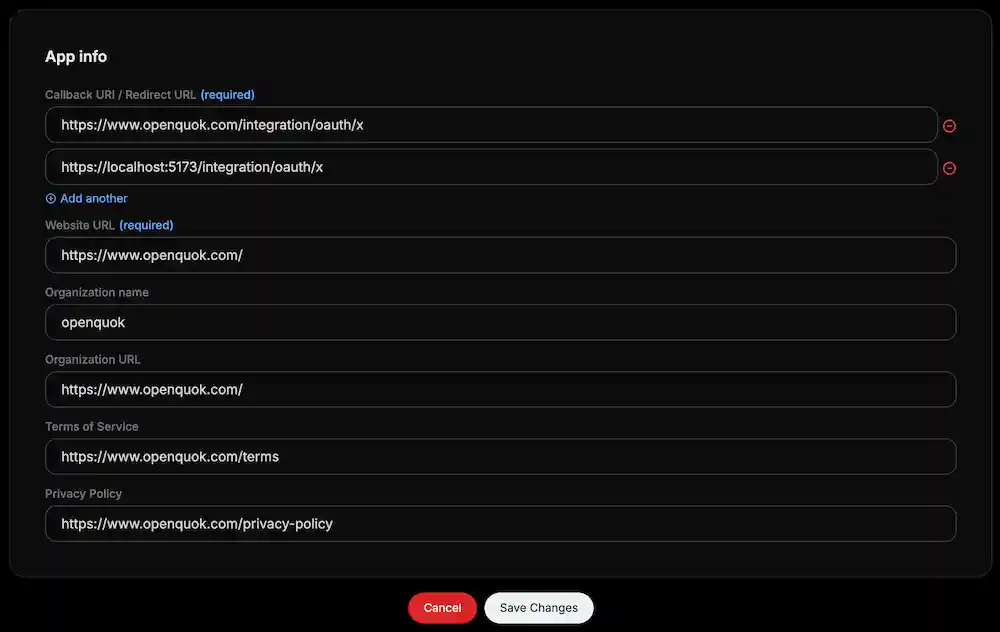
X redirects the browser back to your web app after consent. The backend builds the redirect from FRONTEND_DOMAIN_URL plus /integration/oauth/x.
https://YOUR-FRONTEND-DOMAIN/integration/oauth/xFor local development with HTTPS (recommended):
https://localhost:5173/integration/oauth/xX developer app setup
Create a project and app
Open the X developer portal
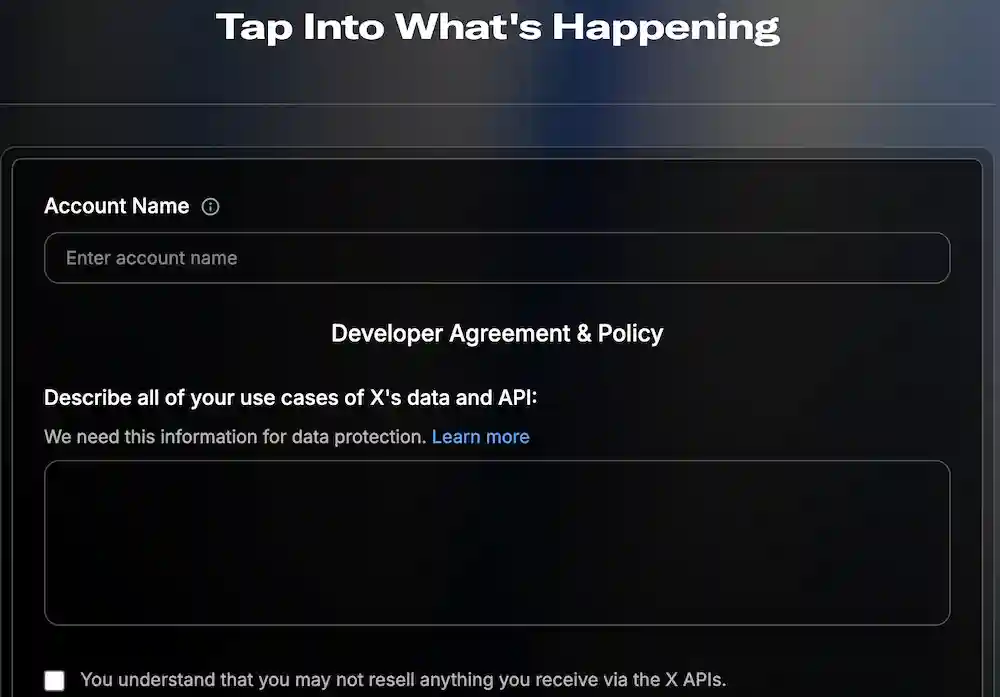
Then, submit the form and the project will be created.
Set up authentication
In Developer Console → Apps -> Settings:
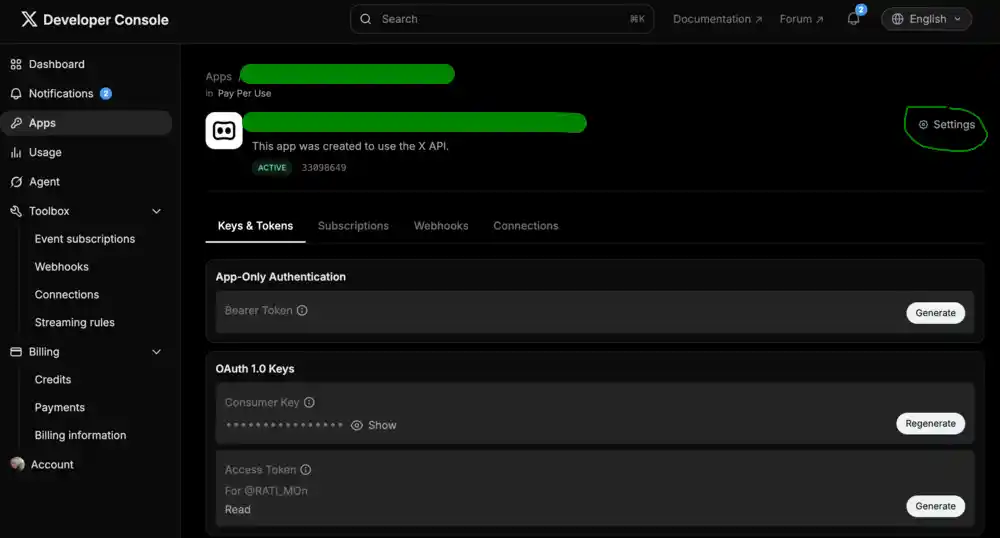
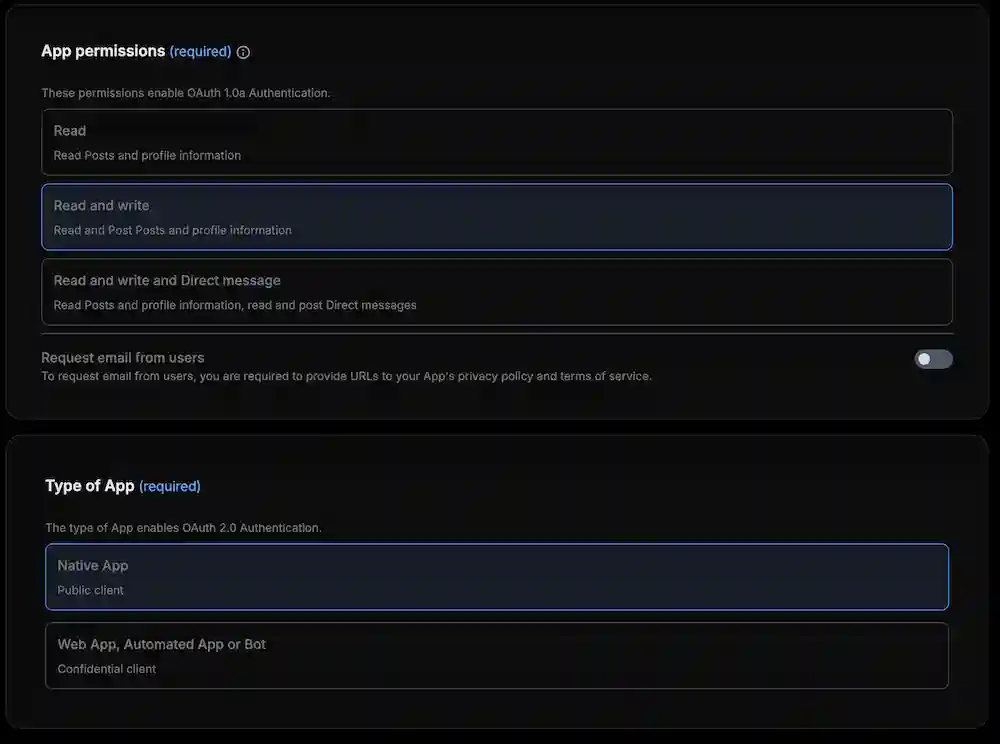
App permissions: Read and Write
Type of App: Native App
Warning
Native App is required for OAuth 1.0a. Using Web App, Automated App or Bot can fail with error code 32
- Callback URI / Redirect URL: add the redirect URI (see OAuth redirect URI above)
Copy API keys
In Keys and tokens, open Consumer Keys and copy API Key and API Secret into X_API_KEY and X_API_SECRET.
Compose settings
Per-post options (composer or CLI) include:
| Setting | Keys |
|---|---|
| Who can reply | who_can_reply_post or x.whoCanReplyPost |
| Community | community / community_url or x.communityUrl |
| Made with AI | made_with_ai or x.madeWithAi |
| Paid partnership | paid_partnership or x.paidPartnership |
| Thread finisher | x.enabled, x.message |
| Thread replies | x.replies[] with delaySeconds |
Standard accounts use a 280 weighted character limit; enable Verified on the channel (in channel settings) for 4000 when the account has X Premium.
Features
Supported
| Feature | Details |
|---|---|
| Text posts | Weighted 280 characters (standard); 4000 when Verified is enabled on the connected channel (X Premium) |
| Image posts | Up to four images per tweet |
| Video posts | One video per tweet (≤ 140 seconds validated in the composer) |
| Who can reply | following, mentionedUsers, subscribers, or verified via compose settings |
| Community posts | Optional community URL (parsed to community_id at publish) |
| Content labels | Made with AI and Paid partnership toggles |
| Thread replies | Scheduled quote-less replies via x.replies[] with per-reply delaySeconds |
| Thread finisher | Closing reply via x.enabled and x.message |
| Platform analytics | Account timeline: likes, replies, reposts, quotes, impressions (unless DISABLE_X_ANALYTICS is true) |
| Per-post analytics | Public metrics for a published tweet when the post row has a release_id |
| Channel plugs | Auto-repost and auto-plug when like thresholds are met |
| Cross-account repost plug | Repost from other connected X channels after publish (x-repost-post-users) |
| @-mention lookup | Unlock the X channel in custom mode, type @ plus at least two characters (or use the toolbar @ button), then pick from suggestions — backed by POST /integrations/mentions |
| OAuth connect | OAuth 1.0a single-step flow; long-lived tokens (reconnect on auth errors) |
Tip
CLI walkthroughs: CLI Examples — X.
Not supported
| Feature | Notes |
|---|---|
| OAuth 2 / PKCE | OpenQuok uses OAuth 1.0a only for X |
| Polls, quote tweets, X Articles | Not implemented |
| Mixed image + video | One media mode per post: up to four images or one video |
| Automatic token refresh | No refresh cron; reconnect the channel when X returns auth errors |
Troubleshooting connect failures
If Add X fails with Failed to generate an authorization URL (provider returned an error)., OpenQuok never received a consent URL from X. The backend already failed on POST https://api.x.com/oauth/request_token (OAuth 1.0a step 1).
Warning
Keep Native App under User authentication settings. OpenQuok uses OAuth 1.0a with consumer keys on the server; switching to Web App, Automated App or Bot often causes X error 32 (Could not authenticate you) for this flow.
Portal checklist (same app as your env keys)
Confirm all of the following on the openquok app in the X developer portal, then click Save at the bottom of User authentication settings:
| Setting | Required value |
|---|---|
| App permissions | Read and Write (not Read only) |
| Type of App | Native App |
| Callback URI | https://www.openquok.com/integration/oauth/x for Cloud (exact match; optional https://localhost:5173/integration/oauth/x for local dev) |
Your screenshot can show correct callbacks and Native App while Read and Write is still missing or unsaved — verify permissions on the same settings screen before copying keys.
X error 32 — consumer keys out of sync
When X returns code 32 (Could not authenticate you), X_API_KEY and X_API_SECRET in the deployment do not match the consumer keys for this app (stale pair, wrong app, or keys regenerated in the portal without updating Vercel).
Save authentication settings
Complete User authentication (Read and Write, Native App, production callback). Save.
Regenerate consumer keys
On Keys and tokens → Consumer Keys, copy the current API Key and API Secret, or use Regenerate and copy the new pair immediately. Do not use Access Token / Access Token Secret here — only consumer keys.
Update production env
In Vercel (backend project) → Production environment variables, set X_API_KEY and X_API_SECRET. Confirm FRONTEND_DOMAIN_URL is https://www.openquok.com. Redeploy the API.
Verify before asking users to retry
From the monorepo, after copying the same values into backend/.env.production.local:
pnpm --filter backend run check:x-oauth -- --env-file .env.production.localExit code 0 means X accepted request_token and Cloud connect should work. Exit code 1 with code 32 means keys or portal settings are still wrong — do not ask customers to retry yet.
Note
On Cloud, workspaces cannot supply their own X app. Only OpenQuok’s shared X_API_KEY / X_API_SECRET pair is used.