Manus
Import openquok-core in Manus 2.0 Studio (Skills, Cloud Computer, Automations). Manus path — not the separate Cue app.
Connect your agent today
Draft from chat, review in your calendar, and publish only what you approve.
Prerequisites
- A Manus account on web, desktop (Manus Studio), or mobile.
- An OpenQuok workspace with at least one connected social channel.
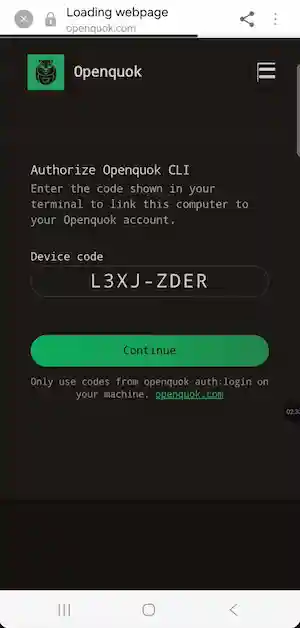
- For OAuth device login: you can authorize the sign-in link on your phone when Manus opens a browser from a Cloud Computer.
Manus vs Cue
Manus is the project platform with Skills, Studio, Cloud Computers, and Automations. Cue is a separate early-access app for personal agents on phone and desktop. This guide is for Manus and the openquok-core Skill — not for Cue-specific setup.
Manus 2.0 workflows
Manus Studio includes professional surfaces such as Video Editor (timeline edits and Alchemy mode) and Game Dev (playable games and Cloud Computer multiplayer). Automations can start work when email, ads, Slack, Notion, or calendar events change. OpenQuok fits after that work: import openquok-core once, then draft and schedule launch posts from the same Manus project — you approve on OpenQuok. Overview: Introducing Manus 2.0.
Installation
Confirm you are on Manus
Product overview: Manus 2.0. Skills sharing: How to share and use Skills in Manus.
Add the openquok-core Skill
Manus Skills are folders built around SKILL.md plus optional scripts. Choose one path:
After import, type / in chat and select openquok-core when you want scheduling commands.
Install the global OpenQuok CLI
Run this on the Cloud Computer or local shell Manus uses for your project:
npm install -g @openquok/auto-cli@latest
openquok --version
Production auth uses the API at https://cli-auth.openquok.com and opens the browser on https://www.openquok.com/cli/device/verify.
CLI version update
Importing a Skill does not upgrade openquok --version. Run npm install -g @openquok/auto-cli@latest when you need a newer CLI.
Authenticate
Recommended: ask Manus to log in to OpenQuok. It runs device OAuth; open the link on your phone, sign in if needed, and tap Authorize.
Alternative for headless or scripted runs: rotate a programmatic token from the OpenQuok dashboard (Account → Settings → Developers → Access):
export OPENQUOK_API_KEY=opo_your_programmatic_token
openquok auth:status
Credentials are stored on the machine that runs openquok — not in the chat transcript.
Confirm the agent can run commands
After auth, ask Manus:
openquok integrations:listVerify in chat
Ask Manus something like:
List my connected OpenQuok channels and draft a post to X for tomorrow at 10am. Do not schedule until I approve on OpenQuok.
Then confirm the draft appears on your OpenQuok calendar or kanban before you move it to scheduled.