ThinkRail
Install the OpenQuok CLI and skill in ThinkRail.
Connect your agent today
Draft from chat, review in your calendar, and publish only what you approve.
Prerequisites
- ThinkRail installed (CLI or desktop). You need git on PATH and an authenticated pi provider.
- A git repo opened as a ThinkRail project, with at least one worktree workspace.
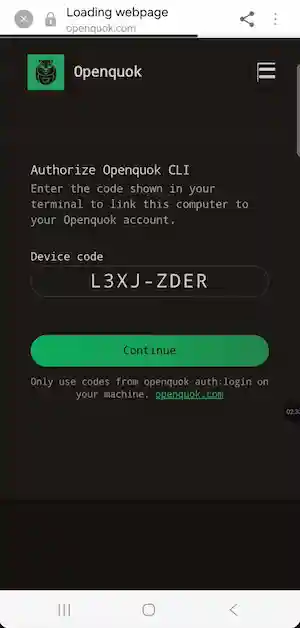
- For OAuth device login: you can authorize the sign-in link on your phone when the agent asks you to log in.
Installation
Install ThinkRail
Install the CLI (opens the IDE in your browser) or the desktop build. Then run thinkrail on a git repository.
Official product page: ThinkRail. Skills layout for the in-process agent: pi skills.
macOS / Linux:
curl -fsSL https://raw.githubusercontent.com/JetBrains/thinkrail/main/install.sh | bash
thinkrail
Windows (PowerShell):
irm https://raw.githubusercontent.com/JetBrains/thinkrail/main/install.ps1 | iexInstall the global OpenQuok CLI
In a ThinkRail terminal scoped to the worktree:
npm install -g @openquok/auto-cli@latest
openquok --version
Production auth uses the API at https://cli-auth.openquok.com and opens the browser on https://www.openquok.com/cli/device/verify.
CLI version update
Installing a skill or starting a new chat does not change openquok --version. Run npm install -g @openquok/auto-cli@latest in the worktree terminal when you need a newer CLI.
Install the openquok-core skill
The skill file lives at agent/skills/openquok-core/SKILL.md in the monorepo. ThinkRail runs pi in-process, so pi discovers skills from the usual locations. Choose one install path:
Start a new pi chat after install so the agent reloads skill instructions. You can also ask in chat: Install the openquok-core skill and confirm openquok auth:status works.
Authenticate
Recommended: ask the agent to log in to OpenQuok. It runs device OAuth; open the link on your phone, sign in if needed, and tap Authorize.
Alternative for headless or scripted runs: rotate a programmatic token from the OpenQuok dashboard (Account → Settings → Developers → Access):
export OPENQUOK_API_KEY=opo_your_programmatic_token
openquok auth:status
Credentials are stored on the machine that runs ThinkRail — not in the chat transcript.
Confirm the agent can run commands
After auth, ask:
openquok integrations:listVerify in chat
Ask the agent something like:
List my connected channels, then draft a TikTok post for tomorrow at 10am — do not publish until I approve on OpenQuok.
Posts should land as drafts or scheduled items in your OpenQuok workspace. Review on the calendar or kanban before anything goes live.
ThinkRail + OpenQuok notes
- CLI-first: openquok-core teaches shell commands in the worktree terminal. ThinkRail is not a native OpenQuok MCP client like Cursor — prefer the skill for scheduling workflows.
- Worktrees: keep social experiments on a dedicated branch. Merge when the copy is approved; delete the rest.
- Pi vs ThinkRail: the same skill files work in a standalone pi CLI session. ThinkRail is the IDE host; you do not need a separate OpenQuok landing for pi.
- Human approval: the agent can queue volume; you approve quality on OpenQuok before publish.
Troubleshooting
- Skill not loading: confirm SKILL.md is under ~/.pi/agent/skills/openquok-core/ or .pi/skills/openquok-core/ and start a new chat.
- CLI not found: install @openquok/auto-cli in the same environment as the worktree terminal (not only on your laptop if ThinkRail runs elsewhere).
- Auth fails: run openquok auth:status in the worktree terminal and complete device login, or set OPENQUOK_API_KEY.