TikTok
CLI examples for TikTok in OpenQuok.
Connect your agent today
Draft from chat, review in your calendar, and publish only what you approve.
Channel quick reference
| Property | Value |
|---|---|
| Provider identifier | tiktok |
| Max caption length | 2,000 characters (-c body) |
| Required attachments | Either one video or one+ images (no mixing) |
| OAuth setup | TikTok |
TIKTOK_ID=$(openquok integrations:list | jq -r '.[] | select(.identifier=="tiktok") | .id')Note
Before you schedule carousels or post at volume, warm the account 7–14 days: How to warm up a TikTok account to reach a US audience. The openquok-tiktok-slideshow skill expects the same pattern.
Video with privacy + DIRECT_POST
test -f ./clip.mp4 && test -s ./clip.mp4
VIDEO=$(openquok upload ./clip.mp4 | jq -c '[{id: .data.id, path: (.data.path // .data.filePath)}]')

openquok posts:create
  -c "Vertical clip — scheduled from the CLI."
  -m "$VIDEO"
  -s "2026-01-01T12:00:00Z"
  -i "$TIKTOK_ID"
  --providerSettingsByIntegrationId "$(jq -nc --arg id "$TIKTOK_ID" '
    {
      ($id): {
        privacy_level: "PUBLIC_TO_EVERYONE",
        content_posting_method: "DIRECT_POST",
        comment: true,
        duet: false,
        stitch: false
      }
    }
  ')"
Photo carousel with title
TikTok photo posts support a separate short title field (often capped around 90 characters). Upload one or more images and pass them as media:
MEDIA=$(jq -s 'add'
  <(openquok upload ./a.jpg | jq '[{id: .data.id, path: (.data.path // .data.filePath)}]')
  <(openquok upload ./b.jpg | jq '[{id: .data.id, path: (.data.path // .data.filePath)}]'))

openquok posts:create
  -c "Carousel caption — links in bio."
  -m "$MEDIA"
  -s "2026-01-01T12:00:00Z"
  -i "$TIKTOK_ID"
  --providerSettingsByIntegrationId "$(jq -nc --arg id "$TIKTOK_ID" '
    {
      ($id): {
        title: "A short photo title",
        privacy_level: "PUBLIC_TO_EVERYONE",
        content_posting_method: "DIRECT_POST"
      }
    }
  ')"
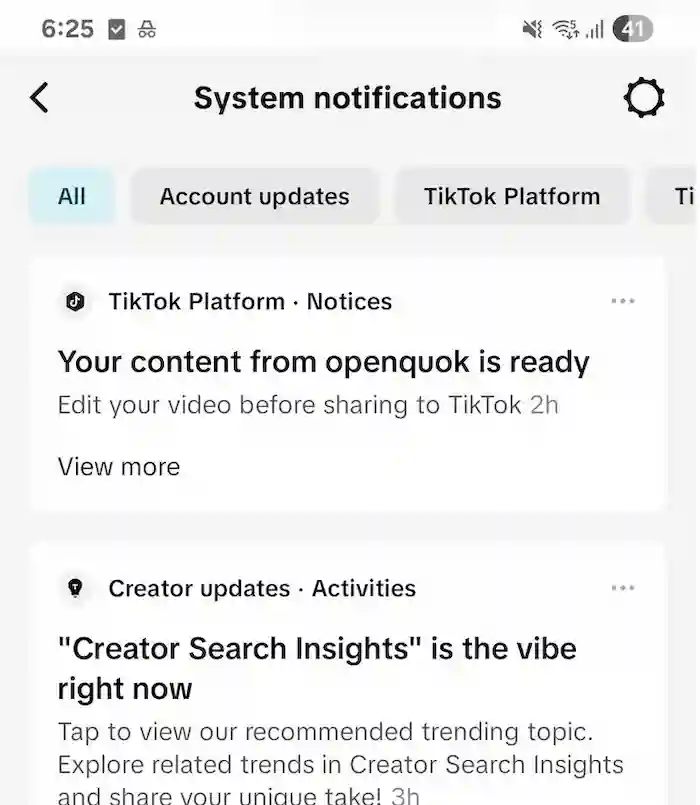
UPLOAD (send to user inbox)
When you set content_posting_method=UPLOAD, TikTok can return a status that indicates the post was sent to the user inbox for final action.
You can see your inbox in the System Notification tab:
openquok posts:create
  -c "Send to inbox instead of direct publish."
  -m "$VIDEO"
  -s "2026-01-01T12:00:00Z"
  -i "$TIKTOK_ID"
  --providerSettingsByIntegrationId "$(jq -nc --arg id "$TIKTOK_ID" '
    { ($id): { privacy_level: "PUBLIC_TO_EVERYONE", content_posting_method: "UPLOAD" } }
  ')"
Platform analytics
openquok analytics:platform "$TIKTOK_ID" -d 30Post insights
POST_ID=$(openquok posts:list | jq -r '.items[] | select(.identifier=="tiktok") | .id' | head -1)
openquok analytics:post "$POST_ID" -d 7
Returns views, likes, comments, and shares when the post row has a linked TikTok video id. Inbox uploads store releaseId=missing until you connect the live id — see Connecting missing posts.
Missing release id (inbox uploads)
POST_ID=$(openquok posts:list | jq -r '.items[] | select(.identifier=="tiktok" and .releaseId=="missing") | .id' | head -1)
openquok posts:missing "$POST_ID" | jq '.data.items[] | {id, url}'
openquok posts:connect "$POST_ID" -r "<tiktok-video-id>"
Media must be publicly fetchable (HTTPS)
TikTok publishes by pulling media from a public HTTPS URL. If publish fails with media URL errors, verify your storage public base URL and TikTok domain verification. See TikTok setup.