Google OAuth
Configure Google login with Supabase Auth (redirect URIs, dashboard settings) for OpenQuok.
Connect your agent today
Draft from chat, review in your calendar, and publish only what you approve.
Overview
Google OAuth is optional. When configured, the backend provides endpoints that start the login flow and handle the callback.
Hosted Supabase vs local
Prerequisites
- OAuth client credentials from Google Cloud Console: a Client ID and Client Secret
- A Supabase project where you can enable Auth providers
Steps
Activate Google as an Auth provider
Hosted Supabase (cloud project)
Find Google in the list and click Enable.
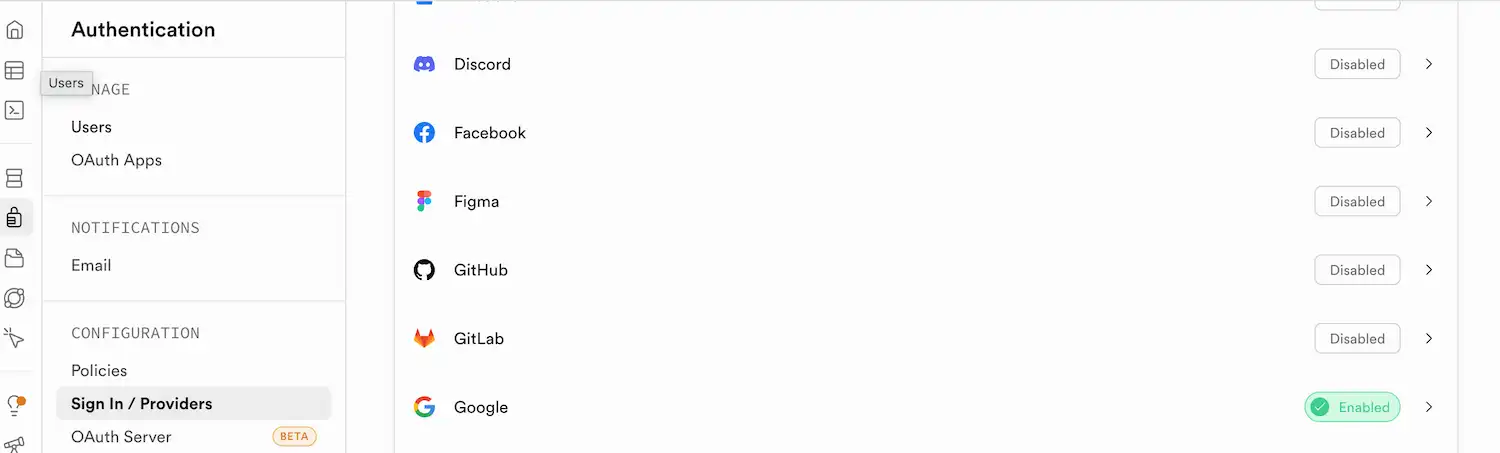
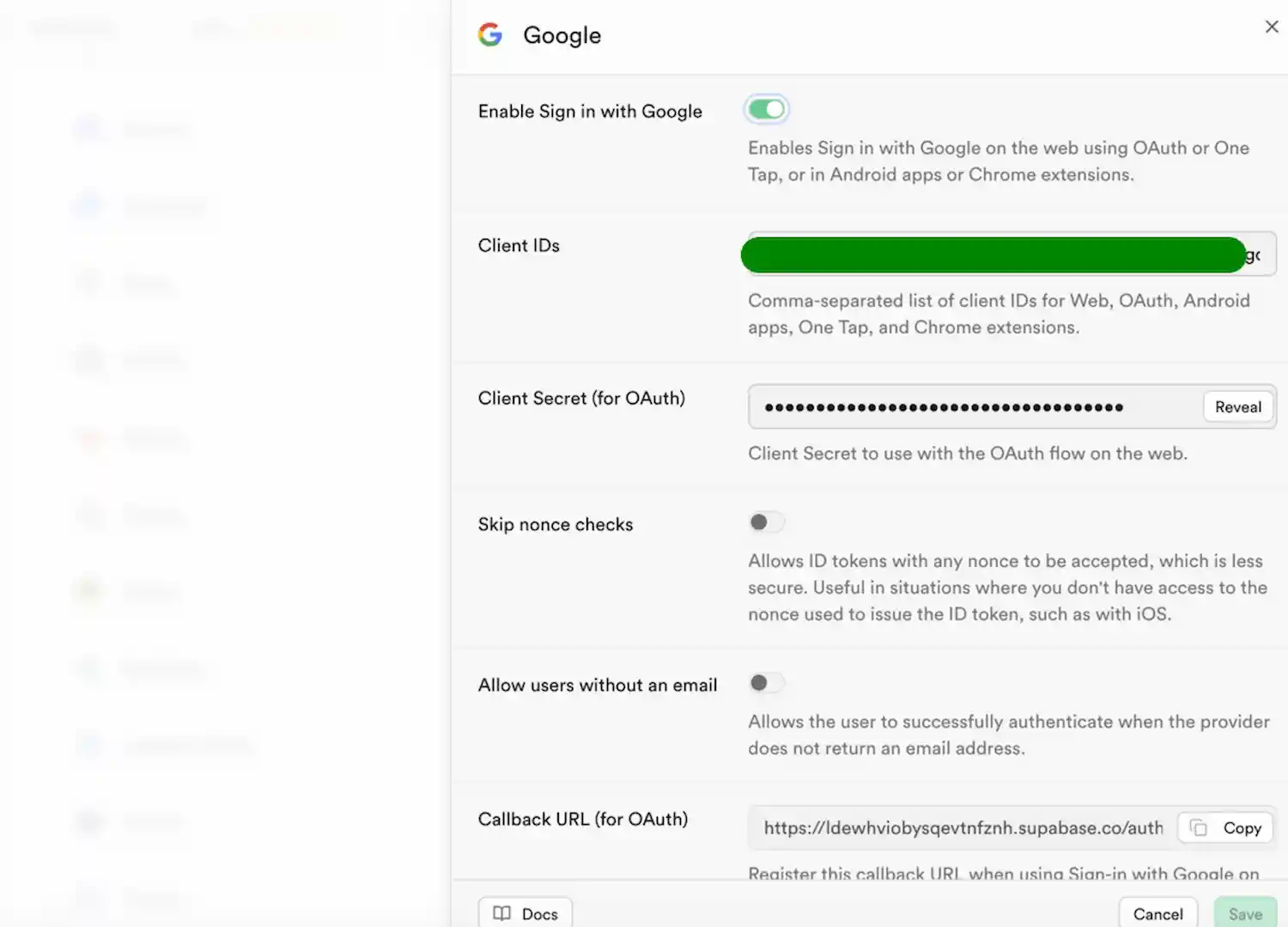
- Leave the provider dialog open — you will paste the Client ID and Client Secret in a later step.
Local Supabase CLI (supabase start on 127.0.0.1:54321)
Copy backend/supabase/.env.example to backend/supabase/.env and set SUPABASE_AUTH_EXTERNAL_GOOGLE_CLIENT_ID and SUPABASE_AUTH_EXTERNAL_GOOGLE_SECRET (same values as in Google Cloud Console).
In backend/supabase/config.toml, under [auth.external.google], set enabled = true.
Run supabase stop then supabase start from the backend directory so GoTrue reloads the provider.
Create Google OAuth credentials
In another tab, open the Google Cloud Console.
Create a new project or select an existing one.
Go to APIs & Services → Credentials.
Configure the OAuth consent screen. Set user type to External.
Click Create Credentials, then choose OAuth client ID.
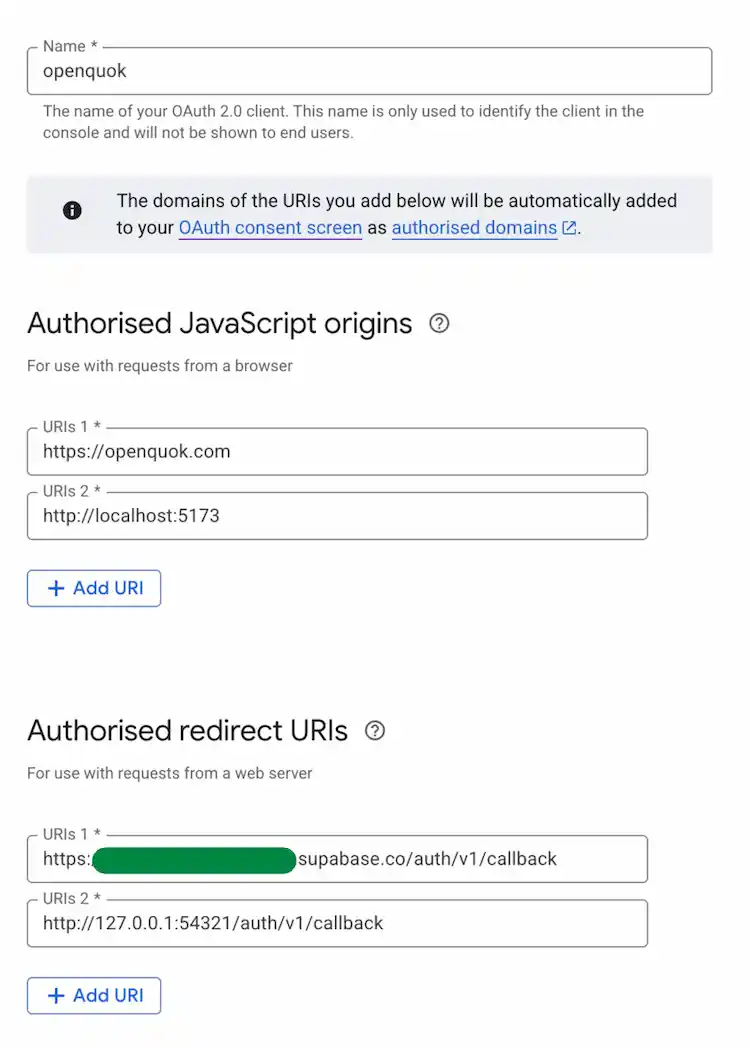
Choose application type Web application.
Under Authorized JavaScript origins, add the origins where your app runs (scheme + host + port only; no path). Typical values for this project:
- Local development (HTTPS dev server):
https://localhost:5173- Production:
https://YOUR_FRONTEND_DOMAINDanger
Under Authorized redirect URIs, add the Supabase Auth callback Google redirects to (one OAuth client can list several URIs):
- Hosted Supabase:
https://YOUR_PROJECT_REF.supabase.co/auth/v1/callback- Local Supabase CLI (same machine as supabase start):
http://127.0.0.1:54321/auth/v1/callback- Copy the Client ID and Client Secret into the Supabase Google provider dialog (hosted) or into backend/supabase/.env (local CLI), then save.
- For hosted projects, set Site URL correctly in Supabase → Authentication → URL Configuration. Local CLI uses [auth] in config.toml (already includes the frontend and backend callback URLs used in this repo).
Configure Supabase redirects back to the backend
After Google redirects to Supabase and Supabase finishes the exchange, Supabase must be allowed to redirect to your backend callback.
Hosted Supabase: in Supabase → Authentication → URL Configuration
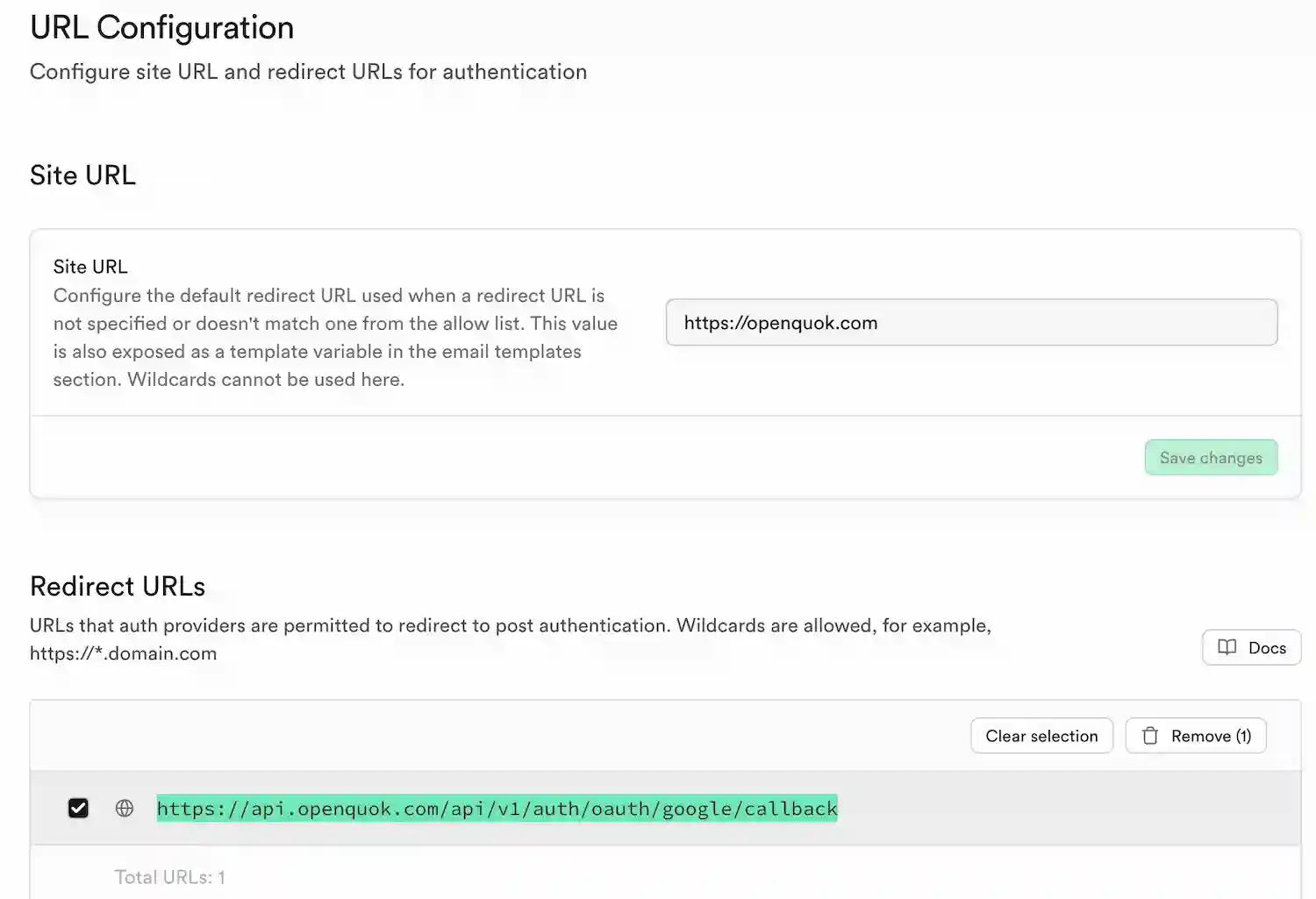
Set Site URL to your frontend (users open this in the browser):
- Local development (HTTPS, same origin as the web app):
https://localhost:5173- Production:
https://YOUR_FRONTEND_DOMAIN- Under Redirect URLs, add the full OAuth callback URL for your backend (origin + API prefix + path). Supabase matches the origin and path; query parameters on the redirect are allowed. Use the same origin as BACKEND_DOMAIN_URL and the same prefix as API_PREFIX (default /api/v1). Callback path:
- Local development when the browser hits the API on the same origin as the web app (recommended with this repo’s HTTPS dev server; see Vite (SvelteKit)):
https://localhost:5173/api/v1/auth/oauth/google/callback- Local development when the browser calls the API only at the API host (not used with the default HTTPS web setup):
http://localhost:3000/api/v1/auth/oauth/google/callback- Production:
https://YOUR_BACKEND_DOMAIN/api/v1/auth/oauth/google/callbackIf you see Supabase redirecting back to the frontend with ?code=... instead of hitting your backend callback, add a wildcard redirect entry (recommended) to avoid allow-list mismatches:
https://YOUR_BACKEND_DOMAIN/**Summary:
- Frontend (Supabase Site URL): local https://localhost:5173, production https://YOUR_FRONTEND_DOMAIN
- Backend (OAuth callback in Redirect URLs): local same-origin https://localhost:5173/api/v1/auth/oauth/google/callback when BACKEND_DOMAIN_URL is the web origin; production https://YOUR_BACKEND_DOMAIN/api/v1/auth/oauth/google/callback
Local Supabase CLI: the same redirect allow-list is configured in backend/supabase/config.toml under [auth] (site_url, additional_redirect_urls). Adjust there if your dev ports differ.
Set environment variables
For hosted Supabase, you do not put Google client secrets in the backend env file—configure them in the Supabase dashboard. For local CLI, put Client ID and Client Secret in backend/supabase/.env as described above.
The backend still needs:
- BACKEND_DOMAIN_URL — for default local HTTPS + same-origin
/api, use https://localhost:5173 so the OAuthredirect_tomatches Supabase allow-list entries. Use your real API public URL in production. - FRONTEND_DOMAIN_URL — must match the web origin (for local HTTPS, https://localhost:5173).
Branding the consent screen (optional)
The first time you test, Google may show that users are signing in to your Supabase project domain. You can adjust branding in Google Cloud; see Supabase: branding the Google OAuth consent screen.
Restart the backend
Restart the backend process so environment changes are loaded.