Why Grok 4.7 fits social scheduling
Most “Grok for social media” advice stops at caption ideas. Grok 4.7 is built for longer jobs: keep the brief, call tools, persist memory and finish the sequence. That is how you move from a draft in chat to a queued post on LinkedIn, X, TikTok, or YouTube.
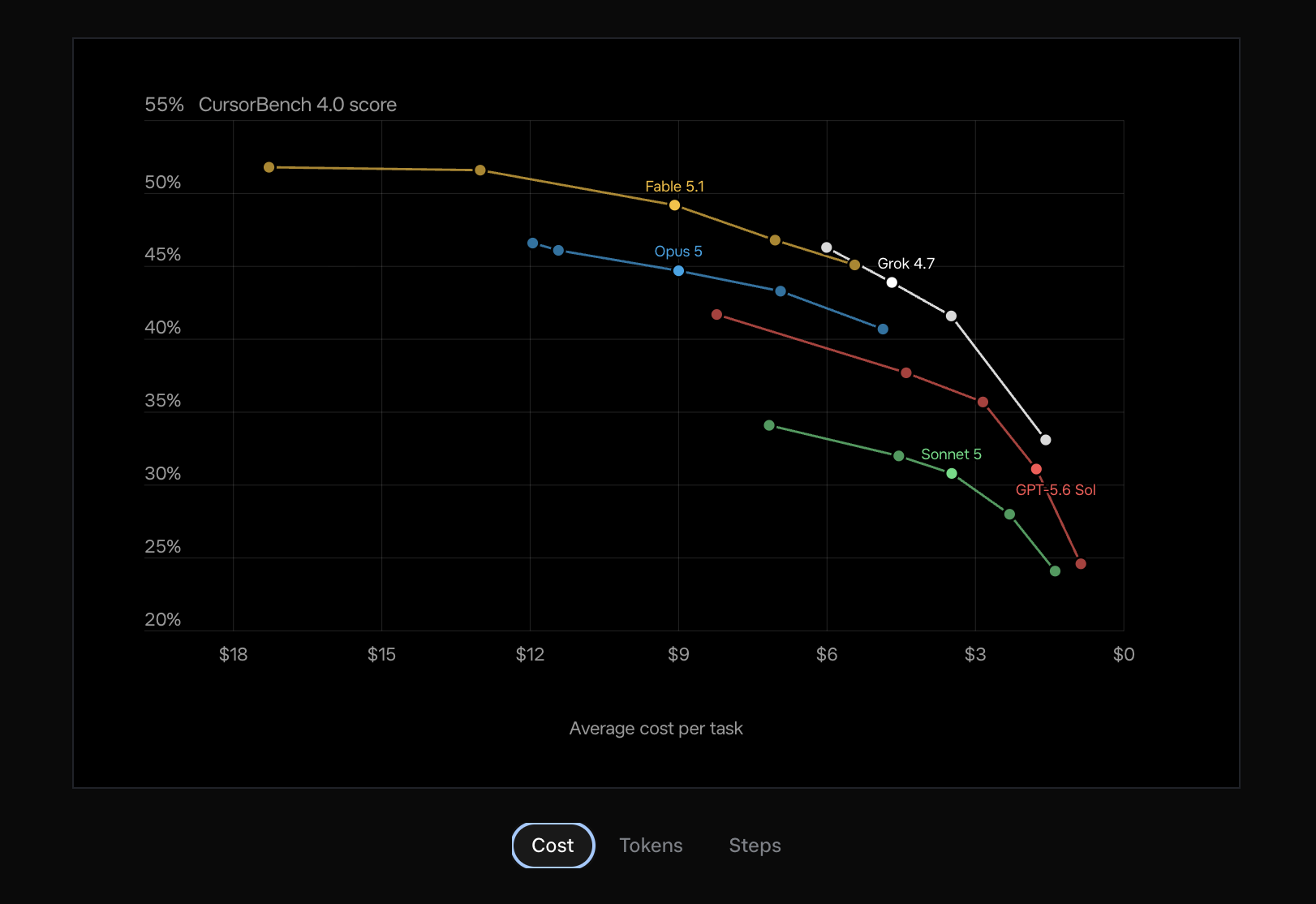
SpaceXAI released Grok 4.7 in September 2026. It targets coding and knowledge work. It stays on task across many steps. It is available in Cursor, Grok Build, and the Grok API at the same token pricing tier as Grok 4.6.
Connect OpenQuok. Grok lists your channels, rewrites per network, and saves drafts. You approve on the OpenQuok calendar or kanban.
If you already use OpenQuok with Grok Bot, this guide adds Grok 4.7 and a Cursor MCP path. Check: Grok Bot + OpenQuok and Cursor + OpenQuok.
What you need
Cursor with MCP, or the Grok Bot desktop or iOS app (available on eligible Cursor and SuperGrok plans).
An OpenQuok workspace with at least one social channel connected.
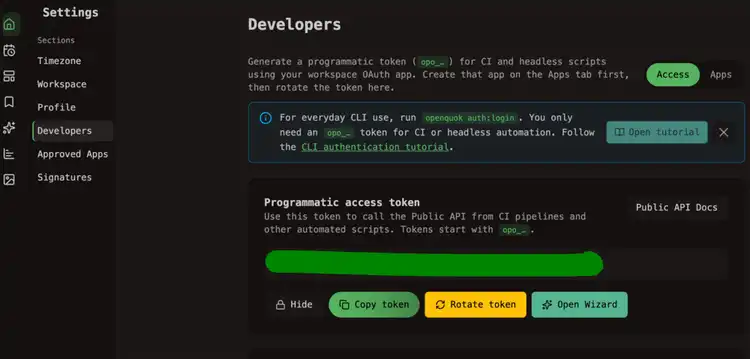
A programmatic token (
opo_…) from Account → Settings → Developers → Access when you use MCP in Cursor.
On OpenQuok Cloud, connect channels in the app. You do not register Meta or TikTok developer apps yourself. Setup: Cursor MCP setup and Grok Bot agent setup.
Path A — Cursor (editor + MCP)
Cursor Agent and Composer call OpenQuok over MCP. Grok 4.7 is available in Cursor. Pick it in the model menu for sessions that list channels and queue drafts.
Cursor is model-agnostic. You can run Grok 4.7 for the scheduling job, then switch to Claude Fable 5.1, GPT-6 Astra, or another model in the same Agent session. The OpenQuok connector stays in place. You can also generate images in Cursor, then attach those files to the OpenQuok draft.
Create a workspace token
In OpenQuok, open Account → Settings → Developers → Access. Create an OAuth app if prompted. Generate an opo_… token. One token maps to one workspace.
Add OpenQuok MCP
Create or open .cursor/mcp.json at your project root. Add an openquok server entry:
            {
"mcpServers": {
"openquok": {
"url": "https://api.openquok.com/mcp",
"headers": {
"Authorization": "Bearer opo_your_programmatic_token"
}
}
}
}
Or put the token in the URL:
            {
"mcpServers": {
"openquok": {
"url": "https://api.openquok.com/mcp/opo_your_programmatic_token"
}
}
}
Reload Cursor. Start a new Agent session with Grok 4.7 selected. Full steps: Cursor MCP setup guide.
Verify in a new session
Ask:
List my connected social media accounts
Grok should call integrationList and return channel names and IDs from your workspace.
Path B — Grok Bot (chat + openquok-core skill)
Grok Bot runs on a shared cloud computer. You message it from macOS, Windows, or iOS. OpenQuok connects through the openquok-core CLI skill, not an always-on MCP socket. Many teams use Grok Bot for volume and Cursor for in-repo work.
Our walkthrough Schedule Social Posts from Grok Bot with OpenQuok covers install, auth, and draft-only prompts. The landing page OpenQuok for Grok Bot shows the same approval flow on calendar and kanban.
Install the CLI and skill on the Bot computer
Ask the Bot to run on its cloud computer, not on your laptop:
            npm install -g @openquok/auto-cli@latest
openquok --version
mkdir -p /workspace/openquok-core
curl -fsSL "https://raw.githubusercontent.com/Ratimon/openquok-monorepo/main/agent/skills/openquok-core/SKILL.md" \
-o /workspace/openquok-core/SKILL.md
Save the skill as openquok-core under Settings → Plugins, or enable it under Yours. Authenticate with device login or OPENQUOK_API_KEY. Details: Grok Bot agent setup.
Before you customize recipes, assemble channel blocks in the Skill Builder.
Verify
In a new Grok Bot chat with Grok 4.7, ask:
List my connected social media accounts
The Bot should run openquok integrations:list or follow the skill and return channel UUIDs for your workspace.
Draft and schedule from the same session
Do not copy captions into five apps. Ask Grok to call OpenQuok tools in Cursor, or to run openquok posts:create from the skill on Grok Bot. Tool names for MCP are in the MCP tools reference.
Write one draft per network
Example prompt:
Rewrite this launch note for LinkedIn, X, and TikTok. Stay under each platform limit. Save each version as a draft in OpenQuok for tomorrow 10am in my workspace timezone. Do not publish.
Recipes: MCP examples. Channel pages: LinkedIn, X, TikTok, Threads, YouTube.
If the draft still sounds like a model, run it through the Humanizer before you approve. For a first time slot, use the Best Time to Post calculator.
Save as draft. You publish.
Tell Grok to save a draft unless you already checked the copy in chat. MCP schedulePostTool and the CLI can draft, schedule, or publish now. Draft is the safe default. Open the calendar or kanban. Edit if you need to. Then approve.
Grok 4.7 and other frontier models — what matters for social
Grok 4.7 is tuned for long coding and office-style tasks. For social work, the practical difference is stamina: list channels, check limits, attach media, and queue several drafts in one thread without losing the plan.
Cursor lets you switch models. Grok 4.7 fits Agent sessions that call MCP tools. Claude Fable 5.1 and other models still work with the same OpenQuok connector. The human gate does not change. The model drafts and queues. You publish.
Prompts that work with Grok 4.7
Keep prompts short. Say the action, the channel, and the time.
Schedule a post to LinkedIn for Friday at 2pm UTC: Shipping a small update on what we learned this week. Save as draft.
Queue my launch announcement on Facebook, Instagram, and Threads — attach the hero image and set it for tomorrow at 9am. Save as drafts only.
What performed best on my channels over the last 7 days? Then draft a follow-up post for my top channel next Tuesday 9am workspace time.
If you also use Claude Code or Cowork
Cursor MCP and Grok Bot are two surfaces on the same workspace. Claude Code and Cowork use the same OpenQuok HTTP MCP with different client config. See How to Post to Social Media with Claude Fable 5.1 for terminal and org connector paths. Pick the client that matches how you work. Many teams run Grok Bot for chat volume and Cursor when they ship in the repo.
Start from Cursor or Grok Bot. Connect a channel. Run the list-accounts prompt. Plans: pricing.