ChatGPT
Connect OpenQuok MCP to ChatGPT via a custom connector or developer-mode MCP app URL.
Connect your agent today
Draft from chat, review in your calendar, and publish only what you approve.
Prerequisites
- A ChatGPT account on Plus, Pro, Business, Enterprise, or Education (custom MCP connectors / developer mode are not available on Free).
- An OpenQuok programmatic token (opo_) scoped to the workspace whose channels ChatGPT should manage.
Overview
ChatGPT talks to remote MCP servers over HTTPS — paste an OpenQuok MCP URL as a custom connector or create a developer-mode MCP app. OpenQuok uses streamable HTTP transport. Embedding the token in the URL path is the simplest auth path for ChatGPT connectors (same pattern as other hosted MCP links).
Official OpenAI guidance: ChatGPT developer mode.
Setup
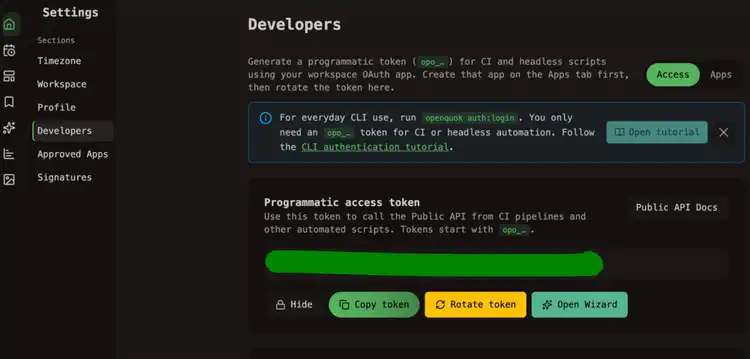
Generate your token
In the OpenQuok app, open Account → Settings → Developers → Access. Create an OAuth app if prompted, then generate an opo_… token.
Enable developer mode (when adding a custom MCP app)
In ChatGPT, open Settings → Security and login and turn on Developer mode if you are creating a developer-mode MCP app. Workspace admins on Business/Enterprise may need to allow custom connectors first.
Add the OpenQuok MCP URL
Open Settings → Connectors (or use the plus button to create a developer-mode app after Developer mode is on). Add a custom connector / MCP server and paste one of:
Name the connector something recognizable (for example OpenQuok). Save, then enable the connector for the chat (Developer mode tool / connectors picker).
Verify
In a new ChatGPT conversation with the OpenQuok connector enabled, ask:
List my connected social media accounts
ChatGPT should call integrationList and return channels from the workspace tied to the token.
Human in the loop
Keep a human reviewing drafts on the OpenQuok calendar or kanban before publish. Write tools in developer mode can change live data — confirm tool calls when ChatGPT prompts you.
Workspace scope
Each opo_ token is bound to one OpenQuok workspace. Use a separate connector (and token) per brand or team when channel lists must stay isolated.
Self-hosted API
Replace https://api.openquok.com with your BACKEND_DOMAIN_URL origin. The MCP path must be publicly reachable over HTTPS — ChatGPT cannot call localhost directly.