Connect flow & rules
How you connect each OpenQuok channel in Add Channel — OAuth, credentials, browser extension, self-host operator OAuth keys, channel keys, and how directory launches differ.
Connect your agent today
Draft from chat, review in your calendar, and publish only what you approve.
Connect rules
How you link each network to your workspace in Add Channel, and which channel key the API uses for that connection.
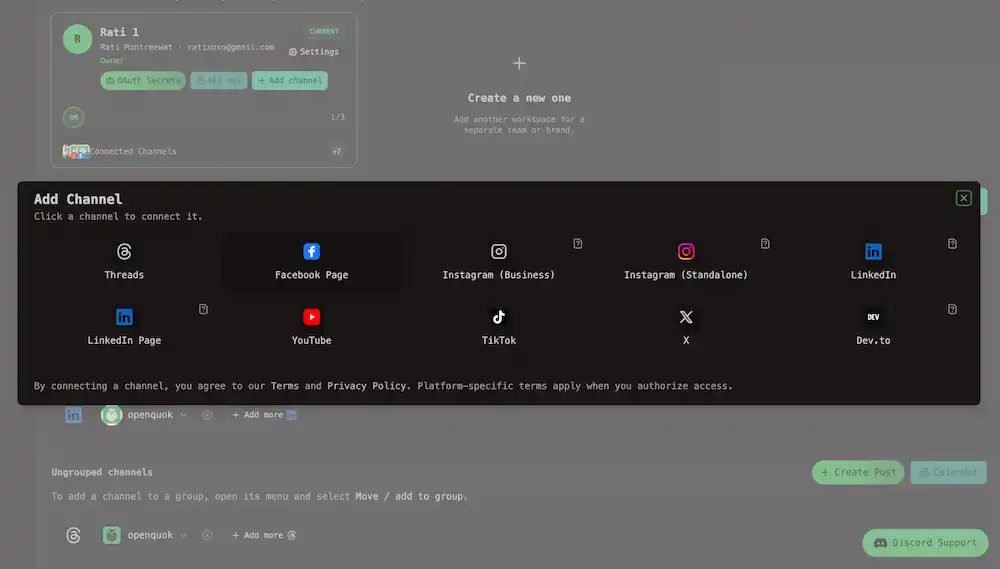
OpenQuok registers twelve social posting channels. Connect each one once per workspace account. See Connect a channel.
Note
Directory launch sites (PeerPush, Uneed, and future catalog rows) are not OAuth posting integrations. They are listed under Directory launch platforms below.


Instagram and LinkedIn each map to two channel keys in the table below (Business and Standalone, or personal profile and Page).
Every platform
How you connect it
How you connect it is what happens when you click the platform in Add Channel:
| Connect type | What you do |
|---|---|
| OAuth | OpenQuok sends you to the platform. You sign in and approve access there. You return to OpenQuok. Some networks then ask you to pick a Page, Instagram account, or YouTube channel. |
| Credentials in OpenQuok | You paste your own API key in a dialog. The self-host operator does not add platform OAuth keys for that channel. |
| Browser extension | One extension, two flows. Social posting (Skool): install the extension, stay signed in on Skool, and approve a dashboard prompt in Add Channel — OpenQuok reads session cookies for scheduled posts, not platform OAuth. Directory launch (PeerPush, Uneed, …): build a product profile on My Products, use Launch to directory (or the Add Channel tile), then the extension autofills the directory submission form in Chrome — no social channel key and no OAuth to the directory. See Browser extension. |
When you self-host OpenQuok, the operator (who runs the server) must register an OAuth app with each network and set that app’s client ID and secret in backend environment variables. Workspace members then connect their own accounts in Add Channel.
The last column marks which channels need that operator setup (Yes for OAuth networks, No when the user pastes a personal API key or uses the browser extension instead).
Tip
On OpenQuok Cloud, those OAuth apps are already configured — you only sign in to your account. For self-hosting, see Social integrations and Docker Compose → Social channels.
Note
Naming in the dashboard vs the API is in Platforms overview. Caption length, media, and editors are in Media rules. Fields in the composer Settings panel are in Per-channel settings.
| Display name | Channel key | How you connect it | Self-host: operator OAuth keys |
|---|---|---|---|
| Threads | threads | OAuth | Yes |
| Facebook Page | OAuth (+ Page picker) | Yes | |
| Instagram (Business) | instagram-business | OAuth (+ Page picker) | Yes |
| Instagram (Standalone) | instagram-standalone | OAuth | Yes |
| OAuth | Yes | ||
| LinkedIn Page | linkedin-page | OAuth (+ Page picker) | Yes |
| YouTube | youtube | OAuth (+ channel picker) | Yes |
| TikTok | tiktok | OAuth | Yes |
| X | x | OAuth | Yes |
| Bluesky | bluesky | Credentials in OpenQuok | No |
| Dev.to | devto | Credentials in OpenQuok | No |
| Skool | skool | Browser extension | No |
Connect in the dashboard only
Most channels use OAuth: you click the network in Add Channel, sign in on the platform site, and return to OpenQuok.
Dev.to and Bluesky use credentials in Add Channel. Skool uses the OpenQuok browser extension while you are signed in on Skool — there is no Skool OAuth app for operators to configure. The same extension also powers directory launch autofill from My Products; that path is in Directory launch platforms below.
Operator setup for each OAuth network is in Social integrations.
Directory launch platforms
Product directories you launch from My Products — not scheduled through the post composer or POST /public/posts.
Directory destinations still appear on the public Channels hub and may show as tiles in Add Channel when you wire a launch to a business profile. There is no OAuth to the directory site and no social channel key for the public posting API.
| Display name | Catalog slug | How you enable it | Social posting channel key |
|---|---|---|---|
| PeerPush | peerpush | Business profile on My Products; Launch to directory or Add Channel tile; browser extension autofill on peerpush.com | — |
| Uneed | uneed | Same pattern on uneed.best | — |
Field mapping, variants, and submission tracking are in Directory submission and per-site guides under Directory integration.