 OpenQuok
Launch on StartupInspire and other platforms in one click not weeks
Directory listings build backlinks and authority when you pace them like a human. OpenQuok autofills startupinspire.com from one profile, tracks domain rating in your workspace, and keeps you in control of every submit on StartupInspire and other launch sites.
Your picks
Curated catalog
Team seats
Shared workspace
Full control
One dashboard
More visibility
Backlinks and traffic
For founders in the AI era
Who launches on StartupInspire with OpenQuok?
Indie founders
You want backlinks without waking up to mass rejections. You review each listing and spread submits across the week.
SaaS teams
You keep launch copy in one workspace. Marketing approves forms before anything goes live on a directory site.
Marketing teams
You coordinate directory launches across sites. OpenQuok autofills from one profile — your team reviews each form and submits on the directory.
How it works
Launch on StartupInspire at your pace
You review every form before submit. OpenQuok autofills from your profile.
Compare dofollow and cost? Open StartupInspire on Build backlinks
Pick directories
Submit only directories that matter and skip the rest
Pick free listing or Starter launch. The extension opens startupinspire.com with your profile. Edit fields, then submit on StartupInspire — and reuse the same profile on other directories you choose.
peerpush.com · Submit product
Directory form
OpenQuok
Social scheduling built for agents
Edit before submit — extension filled this from My Products.
openquok.com
Sample workspace
Acme Marketing
Team Members (3/5)
Invite your assistant or team member to manage your account
Team members on your plan: 3/5 used across your account.
Jordan Lee
Sam Rivera
Ava Chen
Pending invitations
Invited · Member · Expires in 6 days
Workspaces and team
Invite by email assign Member manage seats by Admin
Add Members by email. Admins manage seats. Everyone shares profiles and launch status in one dashboard. Automate profiles, variants, and listing readiness from your terminal or CI, then use the browser extension when you submit on startupinspire.com.
Full dashboard control
Manage your listing in one place tweak each listing efficiently
Edit name, description, screenshots, and links in one dashboard. Tailor StartupInspire technology or category or pricing per site. Changes sync to pending StartupInspire launches and other directories. Track real-time progress.
Built-in DR tracking
Track DR moves compare rivals adapt your launch plan
Monitor domain rating history for your product site, add competitor domains, and see trends next to StartupInspire and other listings you submitted in one dashboard — so you know what is working.
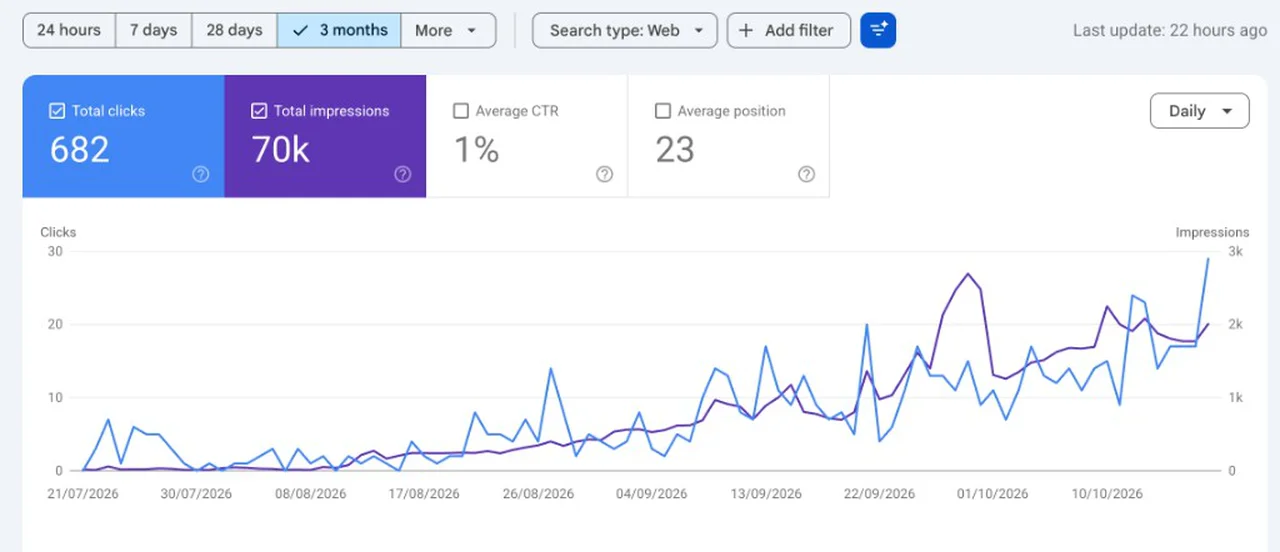
Real traffic growth
Grow more organic traffic track clicks and impressions pivot correctly
Search Console totals and trends next to your launches on startupinspire.com and beyond. See when steady directory submits turn into more visits — not just backlinks on a spreadsheet.
Beyond StartupInspire: Every Supported Launch Platform
Start with StartupInspire, then list on every other supported launch platform from one workspace. Reuse one main business profile — dashboard, browser extension, public API, or an agent host.
- PeerPush List on PeerPush from one business profile.
- Uneed List on Uneed from one business profile.
- Open Launch List on Open Launch from one business profile.
- TinyLaunch List on TinyLaunch from one business profile.
- Fazier List on Fazier from one business profile.
- DevHunt List on DevHunt from one business profile.
- Nick Launches List on Nick Launches from one business profile.
- IndieHub List on IndieHub from one business profile.
- AlternativeTo List on AlternativeTo from one business profile.
- StartupInspire List on StartupInspire from one business profile.You're here
- Trustpilot List on Trustpilot from one business profile.
Frequently asked questions
StartupInspire directory launch and extension autofill
Free listing vs Starter launch, profile fields, extension handoff, dofollow links, and submission tracking — how OpenQuok supports StartupInspire today.
Read the StartupInspire setup guide
Step-by-step self-host setup for connecting OpenQuok to StartupInspire — install commands, auth patterns, and configuration snippets.
Start free. Publish with confidence.
Connect your agent, review every draft, and schedule posts across channels before anything goes live.