Directory analytics
Track domain rating for your product website and workspace competitors on paid OpenQuok plans.
Connect your agent today
Draft from chat, review in your calendar, and publish only what you approve.
Where to find it
Open Account → Analytics. Use the Social | Directory toggle.
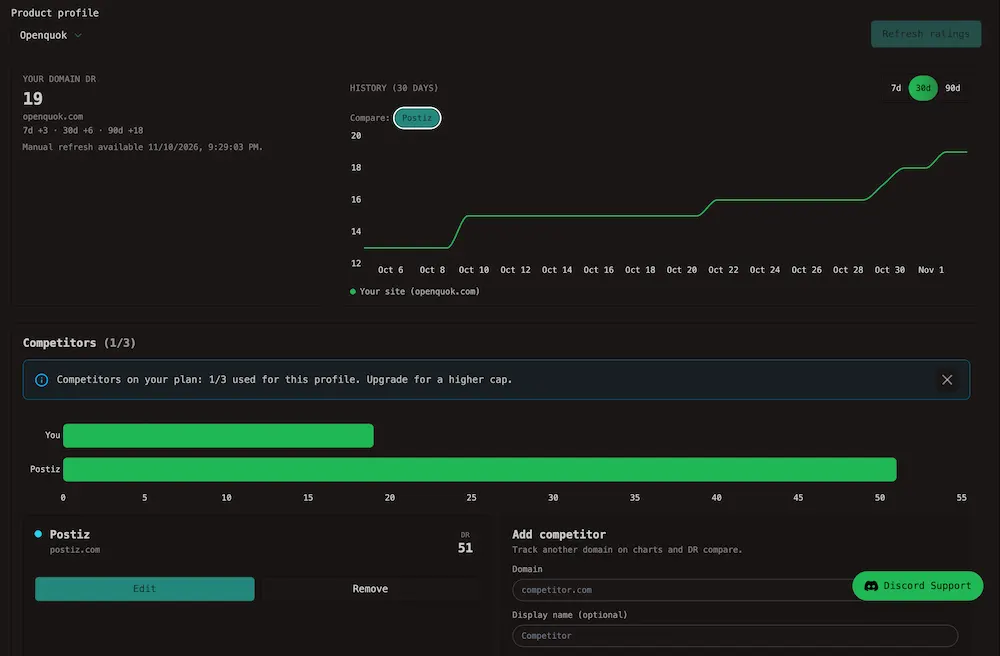
Directory analytics applies to main business profiles (not directory variants). Pick a product profile to see:
- Domain rating (DR) for the website on that profile
- 7 / 30 / 90 day change vs earlier samples
- A history chart for the product domain
- Competitor domains you add for the workspace, each with current DR
Warning
Free workspaces do not include Directory analytics or competitor tracking. Upgrade to a paid plan to use this tab.
Before you start
- Create a main business profile (not a per-directory variant).
- Add your product website URL on that profile.
- Pick the profile in the Product profile menu on the Directory tab.
Without a website URL, OpenQuok cannot look up a domain rating.
What you see
| Area | Meaning |
|---|---|
| Your domain DR | A score for your website hostname, with change over 7, 30, and 90 days |
| History | A line chart for your domain over 7, 30, or 90 days |
| Competitors | Other domains you add to compare against your site |
Product grid DR vs live DR
| Surface | Source | Purpose |
|---|---|---|
| My Products directory grid — DR / DR updated | Build Backlinks catalog metrics | Editorial site scores for each directory destination |
| Directory analytics tab | Saved live DR lookups | Your product’s real domain and competitors you track |
Note
Catalog DR helps compare directory opportunities. Directory analytics tracks your hostname and your competitor list over time.
Competitors
Paid plans include a workspace pool of competitor domains — 2 / 3 / 5 / 10 per workspace on Solo / Team / Ultimate / Max. On Account → Analytics → Directory, pick a main product profile. See Plans and limits and Limits.
Add a competitor
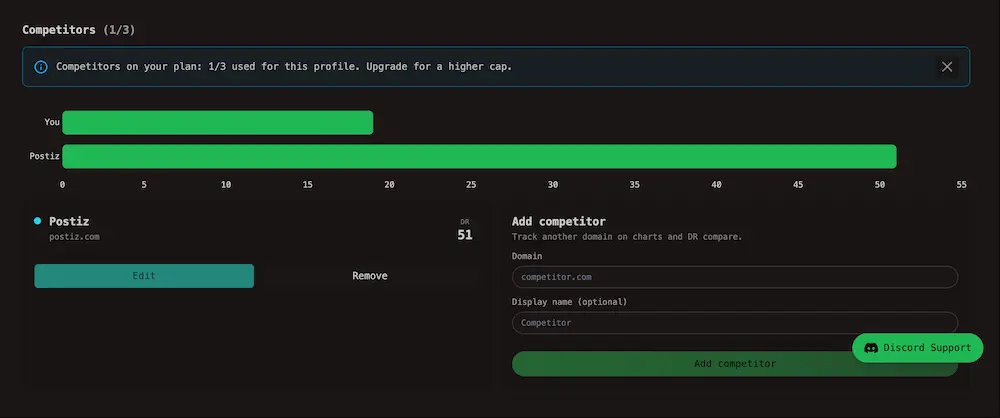
Scroll to Competitors. Enter a Domain and optional Display name, then click Add competitor. The counter (for example 1/3) shows how many slots you use on this profile.
Compare ratings
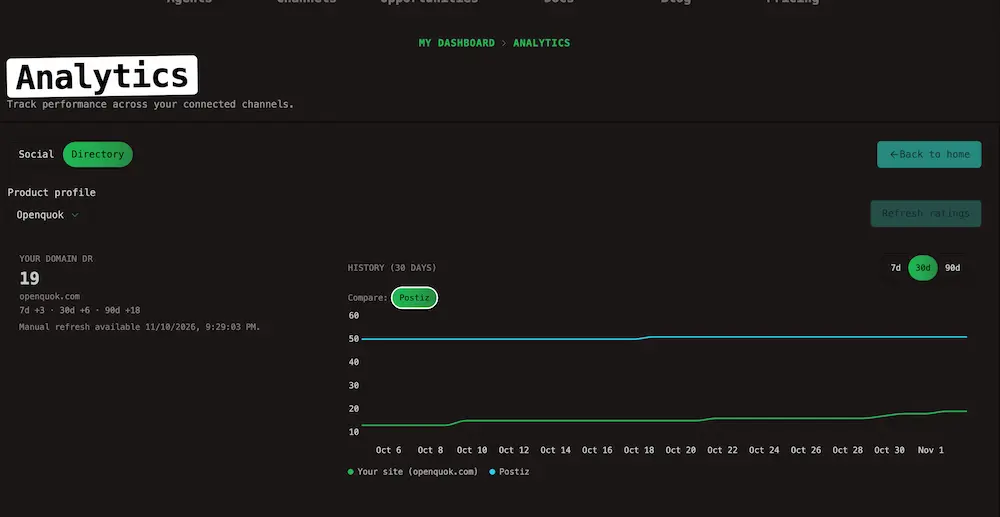
The horizontal bar chart compares You and each added competitor. Turn on Compare pills above the history chart to plot competitor DR lines next to your site over 7, 30, or 90 days.
Manage the list
Use Edit to rename a competitor label (charts and compare pills use the label) or Remove on each row beside the form. Click Refresh ratings at the top of the tab when the page says manual refresh is available.
History chart
The first time you open the Directory tab (or switch the history range) after a domain has no imported history, OpenQuok may pull daily domain-rating points from DataForSEO so the chart is not a single dot. Those points are stored and reused for about one week before a refresh import can run again.
After that, the chart blends:
- Imported daily series — past days from the provider backfill.
- Live samples — new points when OpenQuok refreshes your snapshot (about weekly, or when you use Refresh ratings).
The score uses the same 0–100 scale as the headline DR. Gaps can appear when the provider has no rank for a day.
Note
Paid workspaces need a configured DataForSEO key on the server for live DR and history import. Without it, the page shows stored or empty values only.
Refresh and accuracy
When you open the Directory tab, OpenQuok shows the last saved domain rating if it is less than about 7 days old. If the rating is missing or older, OpenQuok fetches a new score from DataForSEO.
Refresh ratings requests a new lookup for your product domain and competitors. You can use it about once per week per product domain when the page shows that manual refresh is available. If the button is disabled, hover it to see when the next refresh is allowed. OpenQuok also updates old ratings on a background schedule (see Configuration - Worker).
Link type (dofollow / nofollow) on My Products comes from the catalog and your submission notes. Directory analytics does not check every directory backlink in v1.
Self-hosters: set DATAFORSEO_API_KEY and Directory SEO env vars on the API and housekeeping worker. See Directory SEO & DataForSEO.