AI helps you draft a week of posts in one afternoon. It also makes it easy to publish the wrong tone, the wrong brand voice, or a fact that should not go live. For teams, the hard question is not “can we draft faster?” It is “who reviews this before it hits LinkedIn, Instagram, or X?”
Buffer is a strong queue-first scheduler for creators and small teams. If drafts come from Claude, Cursor, OpenClaw, or a script, and a person must approve before publish, you need draft → review → publish — not only an AI assistant inside the same queue. Price matters too: Buffer bills per connected channel. OpenQuok Cloud bills per workspace with a channel bundle on each tier.
At about 15 social accounts, list-rate math is easy to misread. Buffer Essentials at roughly $6/channel/month is about $90/month before volume discounts. Buffer Team (approvals and access controls) at roughly $12/channel/month is about $180/month at the same count. OpenQuok Solo is $29/month on Cloud for a workspace that includes that channel bundle — not multiplied by each network. Confirm current rates on Buffer pricing and OpenQuok Pricing; use OpenQuok vs Buffer to adjust channel count.
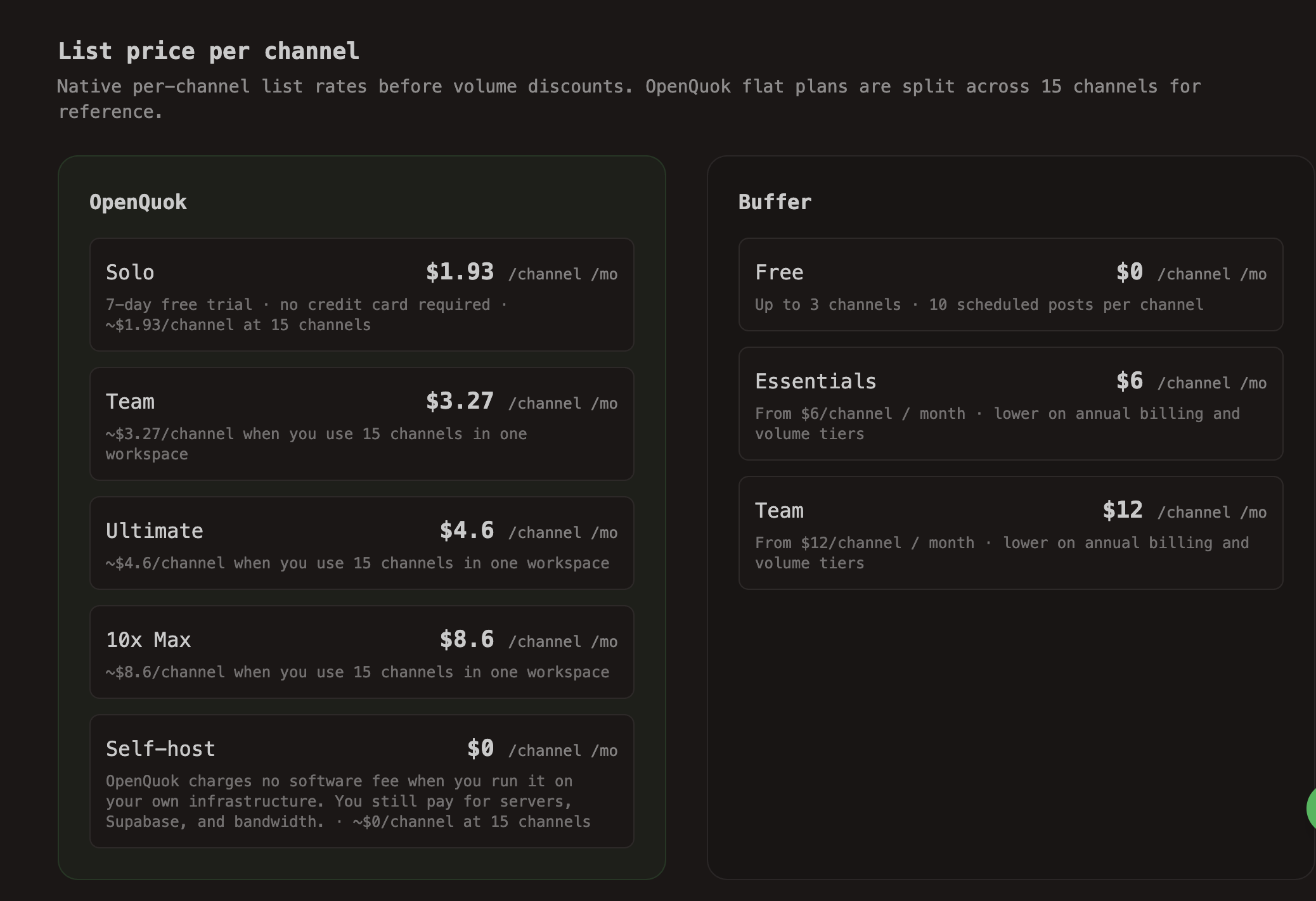
Example at 15 channels: multiply Buffer’s per-channel list rate by your account count, then compare to OpenQuok’s flat workspace price. Totals on OpenQuok vs Buffer.
The rest of this post covers approval workflows, when to stay on Buffer, and when an approval-first stack fits better.
What teams struggle with
Reviews of popular schedulers repeat the same themes, even when people like the product.
Multi-channel planning is the main job. One reviewer ran several blogs and called it a “big headache” to plan posts across Pinterest, Facebook, and X. Central scheduling is the win. Other features matter less until that pain is gone.
Client approval matters as much as the queue. Another reviewer said the value was “scheduling posts and sending them for client approval.” When AI writes the first draft, approval is not optional. It is the product.
Calendar and client visibility frustrate teams. The same review noted a weak mobile app and a calendar that does not color-code clients clearly. When you manage more than one brand, you should see client A vs client B at a glance.
Platform gaps appear late. Reviewers also report missing pieces mid-schedule (TikTok cover limits, thin listening, and similar). Speed can lag. None of that replaces a clear draft → review → publish path.
Buffer adds friction for AI-heavy teams in ways like these:
Approvals and collaboration often need the Team plan
Per-channel pricing rises as you add networks or client brands
External agents still need copy and paste; the AI Assistant lives inside Buffer, not in your CLI, MCP, or agent workflow
If that matches your work, look for multi-channel planning plus approval — not only more templates.
Buffer vs OpenQuok (short)
Use this grid as a snapshot. For the full channel and pricing calculator, open OpenQuok vs Buffer. For other schedulers, see Buffer alternatives.
Dimension | Buffer | OpenQuok |
|---|---|---|
Approval | Team plan for approvals and access controls | Draft → review on the calendar and kanban; send a preview link so clients comment without a login |
Agents | In-product AI Assistant and a rate-limited REST API | CLI, Public API, MCP, and agent integrations |
Self-host | Hosted SaaS only | AGPL stack you run yourself — no software fee on self-host (you still pay for servers and databases) |
Free tools | Free plan and marketing tools | Photo Editor, Skill Builder, and sibling utilities |
Pricing shape | Paid tiers per connected channel | Cloud bills per workspace with a channel bundle; self-host software fee is $0 |
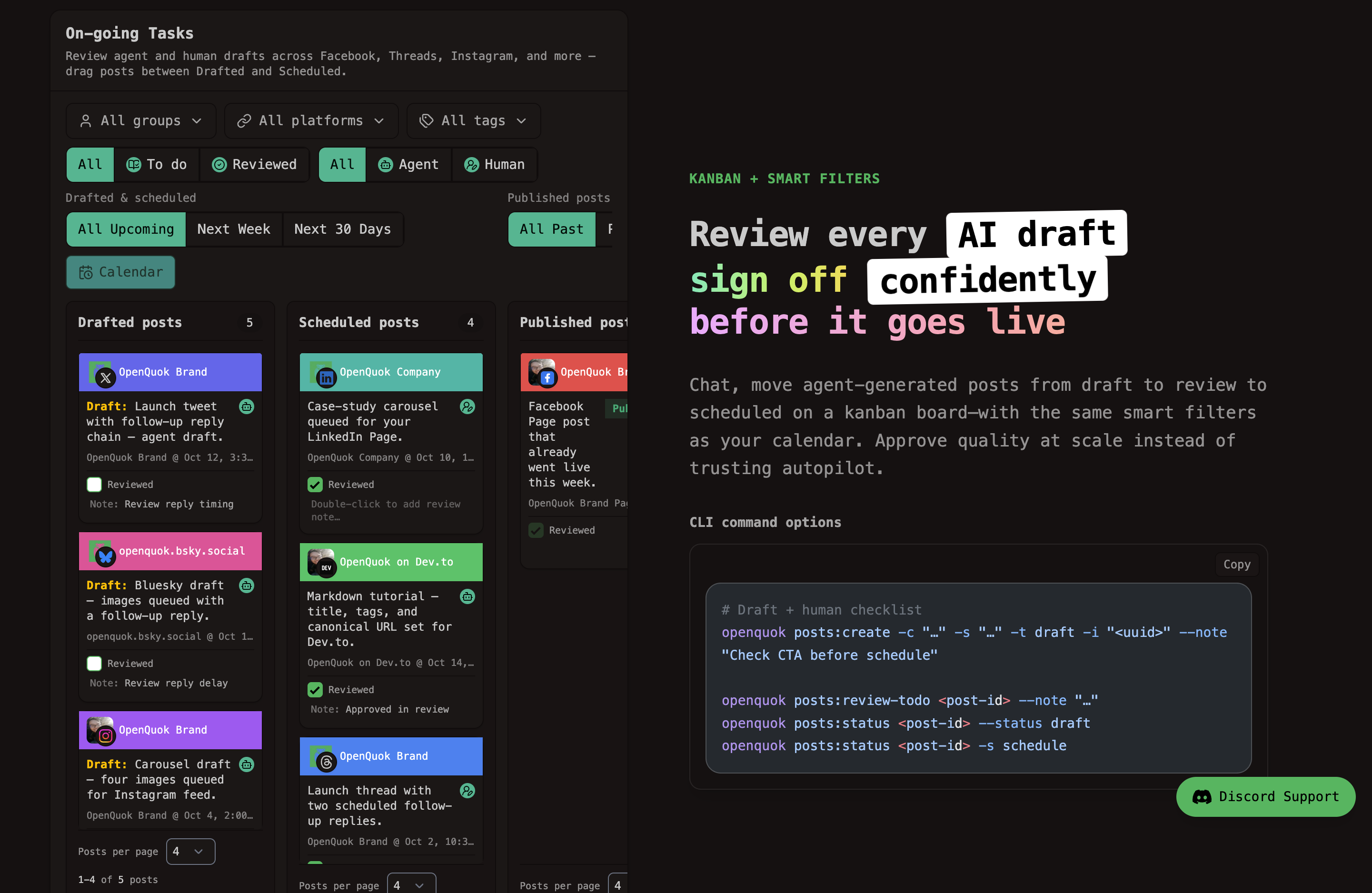
Agencies that split brands can also use workspaces, clients, and preview links.
Pricing when you add channels
Buffer prices paid tiers per connected channel, not as one flat fee for every network you use. Essentials and Team show per channel / month on Buffer pricing. Annual billing and volume tiers can lower the total.
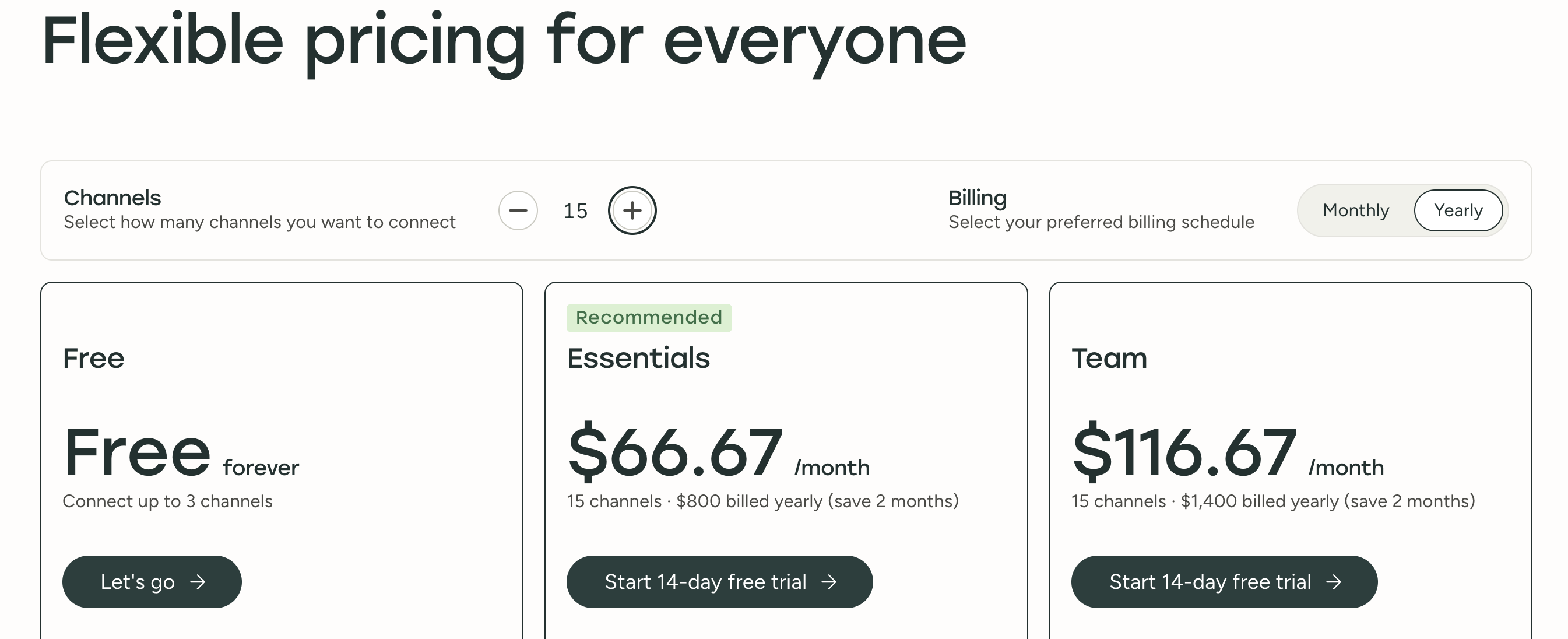
This example uses about 15 social accounts. That matches a common Solo footprint on OpenQuok Cloud (one workspace, bundled channels on the entry paid plan).
Plan | List rate (example) | ~15 channels / month | What you get |
|---|---|---|---|
Buffer Essentials | About $6/channel/month | About $90 before discounts | Paid scheduling and analytics; not the Team approval stack |
Buffer Team | About $12/channel/month | About $180 before volume pricing | Approvals and access controls |
OpenQuok Solo (Cloud) | Workspace tier, not per network | $29 for the tier that includes that channel bundle | The plan card is not multiplied by each network. Higher tiers add seats and capacity without a per-channel line on the card. See Pricing. |
Your total changes if you use fewer than fifteen networks, get Buffer volume tiers, or pay Buffer monthly instead of yearly. Multiply Buffer’s per-channel quote by the accounts you connect. Then compare that total to a flat workspace plan — not to a headline “from $6” alone.
OpenQuok vs Buffer has a connected channels control. It scales Buffer list rates to your count and shows totals next to OpenQuok flat tiers. It also shows a Self-host · $0 row if you run the stack yourself.
Cloud limits, trials, and billing rules are on Pricing and in billing docs. For tier details, see OpenQuok Cloud docs.
Who should switch (and who should stay)
Choose | When it fits |
|---|---|
Stay on Buffer | You want a polished hosted suite, a community inbox, and a simple queue — and most drafting stays inside Buffer. |
Consider OpenQuok | You schedule many platforms and brands from one place (Connect a channel), clients or teammates must approve AI drafts, Buffer Team per-channel math approaches a flat workspace plan, you need Settings and channel groups instead of one queue, or you want self-host OpenQuok. |
A common flow: agent drafts → OpenQuok as draft or scheduled → you or the client review on calendar or kanban → publish. For automation, see Automations and Posts management.
Try approval-first scheduling
OpenQuok lets agents schedule while you keep the final say — schedule plus approve, without copy-paste from the agent tool into a queue tab.
See pricing and start a free trial →
Still comparing? Read Buffer alternatives, OpenQuok vs Buffer, the free Photo Editor, or Get started in the docs.
Review notes above paraphrase public ContentStudio and SocialPilot reviews on G2. Read current reviews before you buy. Buffer list prices change — confirm on buffer.com before you budget.