Overview - Posts management
Calendar views, kanban board, filters, and how to move, review, and act on posts across the calendar grid and My Dashboard.
Connect your agent today
Draft from chat, review in your calendar, and publish only what you approve.
Overview
Calendar for time, kanban for stage — same post groups, two ways to work.
OpenQuok shows the same post groups in two places. Change one view and the other updates.
The calendar is your schedule and history — drafts, scheduled posts, and published posts share one grid.
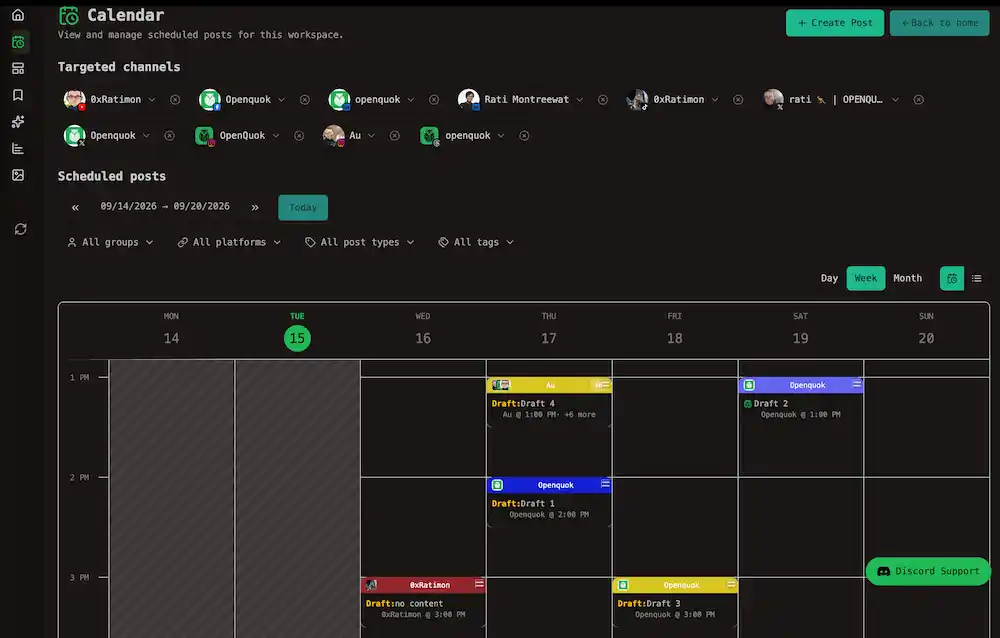
The kanban on My Dashboard → Posts tab shows each group by stage (draft, scheduled, published).
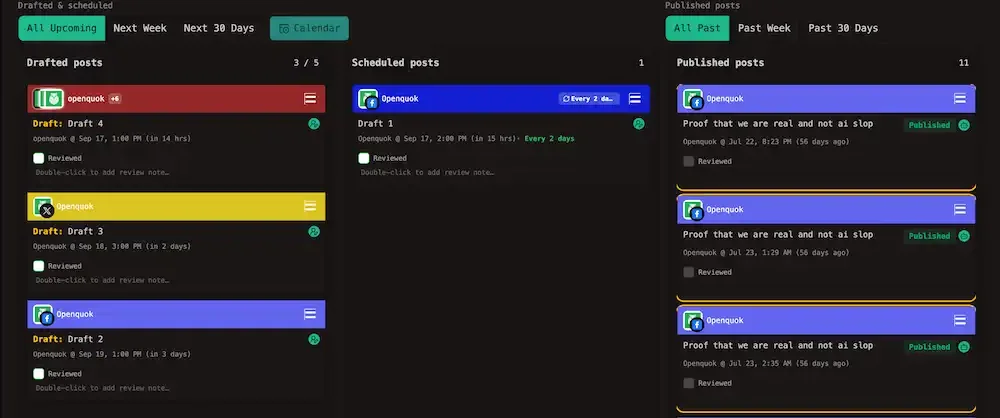
This section covers calendar views, the My Dashboard kanban board, moving posts between slots and stages, post actions (duplicate, delete, statistics), and client approvals. For composing copy and picking save buttons, start with Scheduling and Kanban board.
In this section
Kanban vs calendar
| Question | Use |
|---|---|
| What stage is this post in? | My Dashboard kanban — Kanban board |
| When does it go out? | Calendar |
| Move between draft and scheduled without a new time? | Drag on the kanban |
| Move to a different day or hour? | Drag on the calendar — Moving posts |
See Glossary → Calendar vs kanban for the full comparison.