Overview - Settings
OpenQuok workspace settings — timezone, workspace and team, profile, developers, signatures, and approved apps.
3 min read
Connect your agent today
Draft from chat, review in your calendar, and publish only what you approve.
Overview
Timezone, workspace, profile, developers, signatures, and approved apps — from the account menu.
Where: Open the account menu in the header, then click Settings on the top right. The page opens at /account/settings with a section list on the left.
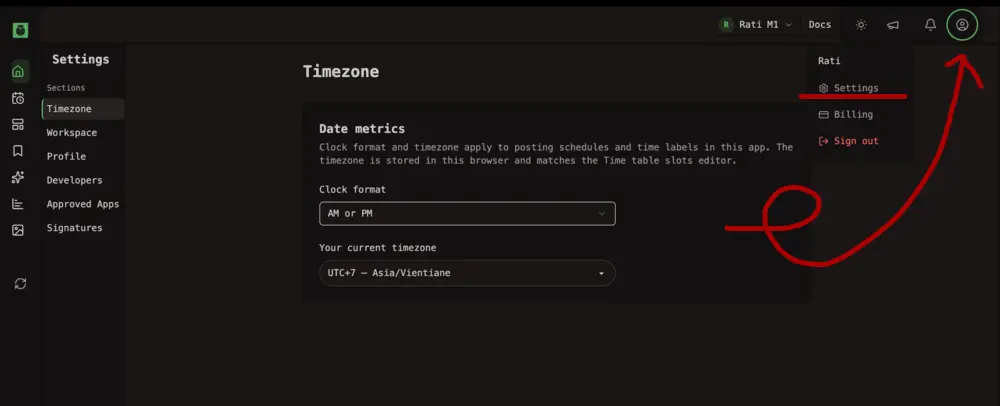
Billing is separate. It lives under the same account menu, not inside Settings. Only the workspace owner can change a Cloud subscription. See Subscription.
The sections
| Section | What it holds |
|---|---|
| Timezone | Clock format and posting timezone |
| Workspace | Workspace list, name, team invites, and roles — see Team |
| Profile | Your display name, username, avatar, and password reset |
| Developers | Programmatic token, MCP snippets, and OAuth apps — see Developers |
| Approved Apps | Third-party apps you authorized through OpenQuok OAuth |
| Signatures | Reusable sign-offs in post editor — see Signatures |
Templates and saved channel bundles live outside Settings — on Templates (see Templates) and in the calendar scheduler.
When a section looks limited
In this section
Team
Workspace list, invites, roles, and client access options
Timezone
Clock format and posting timezone for the calendar
Profile
Display name, username, avatar, and password reset
Developers
Programmatic token, MCP snippets, and OAuth apps
Approved apps
Third-party apps you authorized through OpenQuok OAuth
Signatures
Reusable sign-offs in the post editor