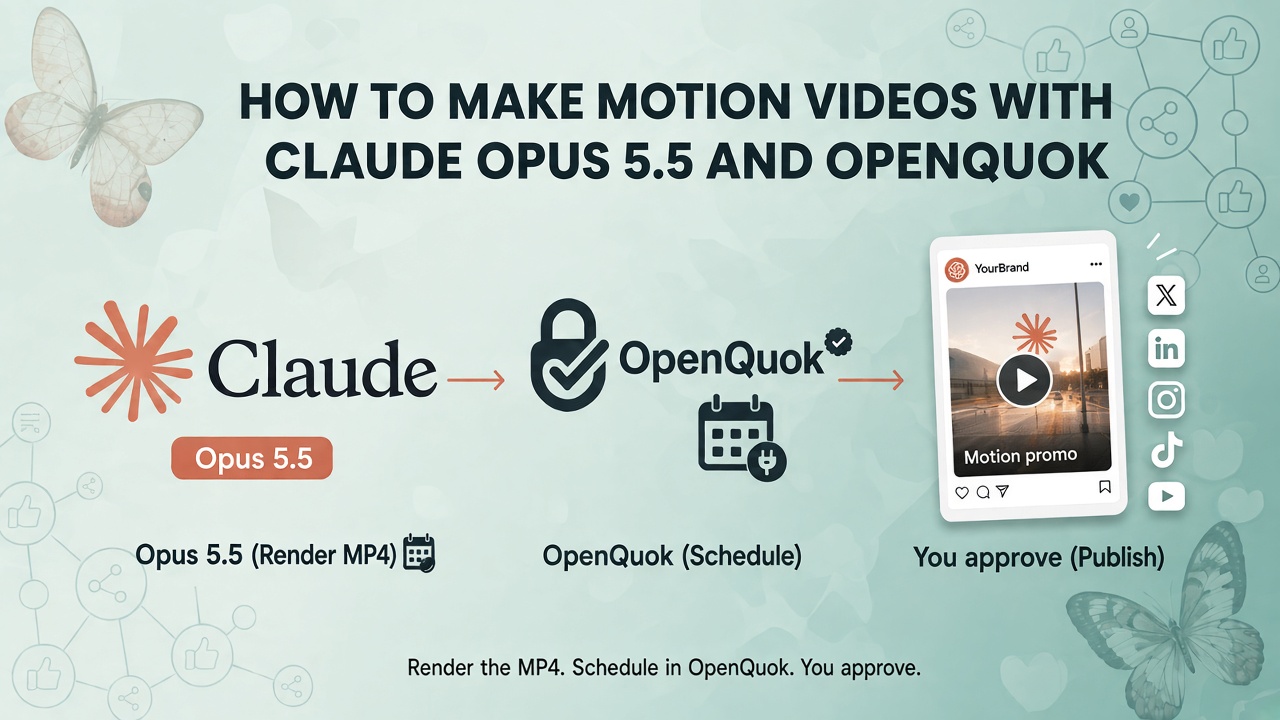
What you are building
You render a short motion MP4 with Claude Opus 5.5. You attach that file in OpenQuok. You schedule social posts to TikTok, YouTube, Instagram, LinkedIn, or other connected channels. You approve drafts on the calendar or kanban before anything goes live.
Opus does not “generate video” like a footage model. It writes React-based animation code (often through Remotion), previews it in a browser, and exports an MP4. OpenQuok is the social scheduler: upload, per-channel preview, draft, and publish through official APIs.
If you already schedule text posts from Claude, see How to Post to Social Media with Claude Fable 5.1. For harness choice (Claude Code vs other agents), see Claude vs OpenAI: Choose OpenQuok and the Right Agent Harness.
How Remotion fits Claude Opus 5.5
Remotion is a React framework for video. Each “scene” is a composition: code draws frames; Remotion Studio plays them back; npx remotion render writes an MP4.
Claude Opus 5.5 in Claude Code (or Claude Cowork) acts as the editor: it reads your repo, edits composition files, runs render commands, and fixes errors from the terminal output. Set model effort to High (or higher) for the final export.
Agent skills teach Claude Remotion syntax so you spend less time correcting imports and APIs. In the video project directory, install the Remotion skill pack, then scaffold a project:
npx skills add remotion-dev/skills
npx create-video@latest
Pick the Hello World template when you are new. Remotion Studio serves at localhost:3001. Keep one agent instruction file per tool so Claude does not mix conflicting rules.
Typical loop inside the project:
Ask Opus to add or change one composition (for example 1080×1920 for vertical social).
Preview in Remotion Studio or let Claude run a studio check command.
Adjust copy, timing, or motion in small steps—one change per turn.
Run
npx remotion render --output promo.mp4when the preview looks right.
What works well: terminals, typewriter text, logos, UI mockups, counters, light 3D rotation, slide-style beats.
What fails often: organic characters, many simultaneous layout changes, or a full soundtrack from code alone. Write the social caption in OpenQuok (or the Humanizer) after the render.
Path A — Remotion project + Opus (recommended for motion graphics)
Step 1 — Point Claude at your product
Open the repo or site context in Claude Code. Ask which sections would work as a 15–30 second vertical promo. Lock one concept before you ask for motion.
Step 2 — Build one composition at a time
Use a fixed structure: intro, main content, outro. Put brand assets in public/ and give exact paths (for example public/logo.png). A practical first scene is a terminal window with a typewriter line, then a logo outro.
Step 3 — Export MP4
npx remotion render MyComposition --output promo.mp4Replace MyComposition with the id in the Remotion sidebar. Export a 9:16 file when TikTok, Reels, or Shorts are primary targets.
Path B — Opus without a Remotion folder
You can ask Opus 5.5 to create a self-contained render script in Claude Code or Cowork (“1080×1920 vertical promo MP4 for …”). The same rules apply: one scene per iteration, High effort for the final render, then save promo.mp4 to disk for upload.
Path C — Schedule in the OpenQuok dashboard (manual publish layer)
Connect channels first: Connect a channel.
Open My Dashboard or the calendar → Create Post.
Select channels or a channel group.
Upload
promo.mp4— see Media in the composer (MP4 up to 1 GB; large files are easier through the CLI multipart path).Write captions; use Post Preview for crop and length warnings.
Choose Save as draft, Add to calendar, or Publish now — Scheduling.
For Facebook Page video workflows, see Schedule Facebook Page posts, Reels, Stories, and comments with OpenQuok.
Path D — Fully automate with the openquok CLI
After promo.mp4 exists on disk, the CLI can upload and schedule without opening the dashboard. Install and authenticate per CLI getting started (device login or opo_ token).
1. List channels
openquok integrations:list2. Upload the video (multipart for large clips)
openquok upload ./promo.mp43. Schedule a social post (replace integration id, time, and caption)
MEDIA=$(openquok upload ./promo.mp4 | jq -c '[{id: .data.id, path: .data.filePath}]')

openquok posts:create \
  -c "Motion promo — link in bio." \
  -s "2026-10-15T14:00:00.000Z" \
  -t schedule \
  -i "" \
  -m "$MEDIA"
Use -t draft instead of schedule when you want a kanban review first. TikTok inbox or finish-in-app flows can use --note per Managing posts.
For a compose-then-queue pattern with Payload Wizard and the posting API, see Social scheduler stack: Jev + OpenQuok's posting API.
Path E — Fully automate with MCP (Claude Code + OpenQuok)
Connect OpenQuok MCP in Claude Code: Claude Code MCP setup. Overview: MCP getting started.
OpenQuok MCP exposes integrationList, schedulePostTool, and uploadFromUrl. It does not render video. Your agent still produces promo.mp4 in the Remotion project (Path A). Then automate publishing in one of two ways:
E1 — Agent runs the CLI (best for local MP4 files). Install openquok-core so Claude can run openquok upload and openquok posts:create in the terminal. Example instruction you can paste in chat:
Upload ./promo.mp4 with openquok, list my integrations, and create a draft post for my TikTok channel with caption "…". Do not publish until I approve on the OpenQuok calendar.
E2 — Public URL on schedulePostTool (best when the MP4 is already on HTTPS). Host the file at a public https:// URL, then ask the agent to call schedulePostTool with attachments — OpenQuok fetches and stores the video before creating the post. Details: MCP tool reference (uploadFromUrl and schedulePostTool).
Terminal-first MCP scheduling without Remotion is covered for another client in Schedule Social Posts from Muse Code with OpenQuok; the same integrationList → schedulePostTool flow applies here once the MP4 exists.
Teams that need preview sign-off: Team collaboration in OpenQuok: workspaces, clients, and preview links.
TikTok and new accounts
Automation does not replace account trust. For new TikTok accounts, many creators post manually for about two weeks. Read How to warm up a TikTok account to reach a US audience and Why My TikTok Videos Have Low Views and What to Fix First. After warm-up, schedule through OpenQuok or keep using inbox upload when you need trending audio in the app.
End-to-end flow (choose your path)
Stage | Tool | OpenQuok path |
|---|---|---|
Render MP4 | Claude Opus 5.5 + Remotion in Claude Code | — |
Polish caption | Humanizer or composer | |
Upload + schedule | Dashboard, CLI, or MCP agent | |
Approve | You | Draft → scheduled → publish |
Takeaway
Claude Opus 5.5 plus Remotion handles motion production in your IDE. OpenQuok handles the social layer: verified upload, per-network preview, drafts, and scheduled posts across channels.
Open your workspace or start from Creating posts if the composer is new to you.