Global plugs
Run actions or define channel rules when a post gets enough likes.
Connect your agent today
Draft from chat, review in your calendar, and publish only what you approve.
Global plugs
Channel rules at Auto Plugs — run when likes on a published post reach your threshold.
Where: Account → Auto Plugs.
A global plug is a channel rule. It watches likes on posts that already published. When the count reaches your threshold, OpenQuok runs the rule. If the threshold is never met, the worker stops after three checks.
For one scheduled post, use an internal plug or a cross-account plug in the post editor instead.
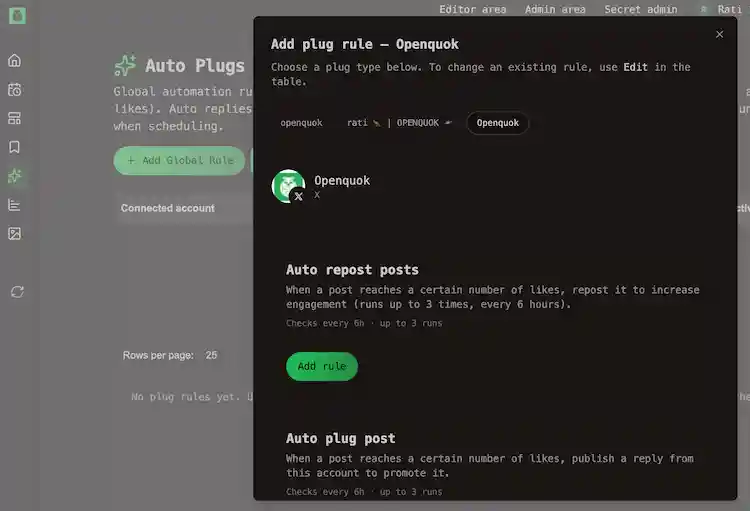
The two global Rules
| Rule | What it publishes |
|---|---|
| Auto repost posts | Repost or reshare the live post so more people see it |
| Auto plug post | A follow-up from the same channel — a reply on X or Threads, or a comment on a LinkedIn Page post |
Use auto plug post for a promo link or CTA after the post proves it resonates.
The worker checks every 6 hours, up to 3 times per published post. New rules apply to posts published after you save.
Supported channels
The Auto Plugs page lists only channels that support at least one global rule today:
| Platform | Auto repost | Auto plug post |
|---|---|---|
| X | Yes | Yes |
| LinkedIn Page | Yes | Yes |
| Threads | No | Yes |
Personal LinkedIn profiles have per-post plugs only. They do not appear for global rules.
Set up a global plug
Open Auto Plugs
Go to Account → Auto Plugs. Pick the channel from the grid.
Turn the plug on
Each rule has an on/off switch in the add or edit dialog.
Set the likes threshold
Enter Amount of likes. Choose a count your channel usually reaches within a few days — the worker only checks three times.
Add follow-up content (auto plug only)
Auto plug post needs the reply or comment text OpenQuok will publish when the threshold is met.
Save
The rule applies to posts published after you save. It does not change posts that are already live.
CLI and API
Use openquok plugs:catalog, plugs:list, plugs:upsert, and related commands. See CLI usage — Global plugs for command examples. HTTP routes are in Public API → Plugs and Plug catalog API.
Likes and analytics
Global plugs read like counts from the network API. If analytics are disabled or unavailable for a channel (for example DISABLE_X_ANALYTICS on self-hosted X), threshold rules may not fire.